



How to Wire the Switch on the Skil HD77 Worm Drive Saw
In February, 2009, the Skil HD77 Worm Drive Saw was updated with a new switch. The new switch for the HD77 is wired differently than the old switch, and, if the new switch is installed incorrectly, a blown breaker is waiting to happen.
This article does not detail the full replacement steps for this switch. For additional information on switch replacements not explained here, please read our "Power Switch Repair 101" article.
This article explains the wiring for both the old and new switches.
The Old HD77 Switch Wiring
Below is a picture of the old, obsolete switch:
[caption id="" align="aligncenter" width="542" caption="THE OBSOLETE HD77 POWER SWITCH (FIGURE A)"]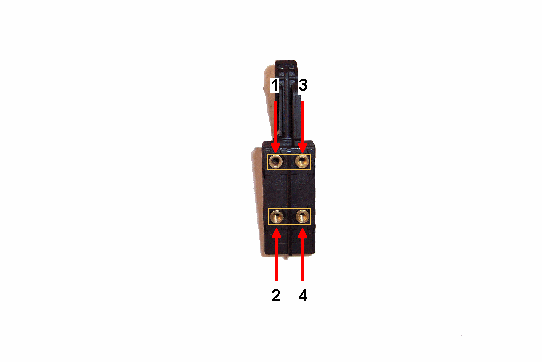 [/caption]
There were two different ways that the obsolete switch could be wired:
1. Power cord wires could have been connected to terminals 1 and 3 in Figure A, with the saw's motor wires connecting to terminals 2 and 4. Or,
2. Vice versa. Power cord wires could have been connected to terminals 2 and 4 in Figure A, with the saw's motor wires connecting to terminals 1 and 3.
The above wiring configuration is now obsolete for the new Skil HD77 Worm Drive Saw power switch. If a new HD77 power switch is wired incorrectly (wired like the old switch), using the saw could be hazardous and will definitely cause a flipped breaker.
The Active HD77 Switch Wiring
The new, active HD77 power switch replaces the obsolete part. Although the new switch looks just like the old switch, the wiring is different and must be done correctly.
Below is a picture of the active switch and its wiring configuration:
[caption id="" align="aligncenter" width="542" caption="THE ACTIVE HD77 SWITCH (FIGURE B)"]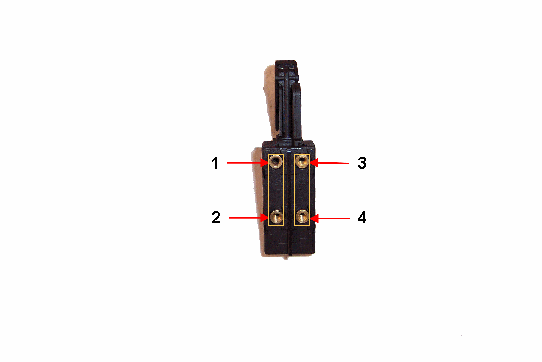 [/caption]
There are two different ways that the active (new) switch can be wired:
1. The power cord wires can be connected to terminals 1 and 2 in Figure B, with the saw's motor wires connecting to terminals 3 and 4. Or,
2. Vice versa. Power cord wires can be connected to terminals 3 and 4 in Figure B, with motor wires connecting to terminals 1 and 2.
For both methods of wiring the new switch, it is most important that the power cord wires and motor wires are connected to corresponding terminal pairs as shown in Figure B.
If your Skil HD77 needs a New Switch--Click here. This link will take you to the part page for the replacement switch compatible in the following saws:
- HD77 (F012HD7702)
- HD77 (F012HD7710)
- HD77 (F012HD7711)
- HD77 (F012HD7712)
- HD77 (F012HD7713)
- SHD77 (F1012SD7700)
- SHD77M (F012SD7702)