Sorry, we couldn't find any existing reviews that matched. Try using some different or simpler keywords.
★★★★★
★★★★★
Another successful repair!!
Very grateful to have found this part on eReplacementParts.com. Not my 1st purchase from this site, nor my last. Part arrived promptly, & fit perfectly. Installation was a breeze thanks to some instructions provided on site.
Guest - January 15, 2020
Verified Purchase
Customer Repair Instructions
All our customer repair instructions are solicited directly from other customers just like you who have purchased and replaced this exact part.
Easy
1- 2 hours
(2 rated repairs)?
< Prev
1
Next >
Sort by:
Sorry, we couldn't find any existing installation instruction that matched.
Switch stopped working, collar broke tightening it.
Unplug drill press. Remove switch screws. Remove wires from old switch. Press switch out of face plate and replace with new switch. Replace wires exactly as they were removed and screw switch plate back on to machine.
For the collar, tighten the shaft retaining screw on the right side so you are unable to lower chuck, then remo
... Read moreve two bolts from chrome spring housing. Gently remove housing from bolt. Remove the two screws holding the depth gauge and the gauge itself from the collar. Remove spindle arm assembly from case. Holding the chuck, loosen the shaft retaining screw and lower the entire shaft from the case. Loosen the collar retaining allen and the collar tightening bolt in front. Slide collar off of the shaft and replace with new collar. Reverse order to reassemble.
Read less
Did you find this story helpful?
Thank you for voting!
The depth stop is unreliable and the stop rod is crooked and scrapes on the stop bracket
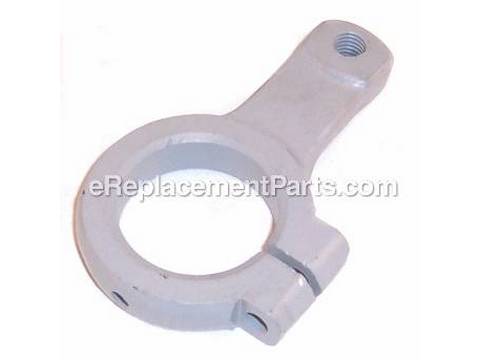
The depth stop rod is a bit of M10-1.5 threaded rod, with acme threads above and ordinary 60 degree V threads for an inch at the bottom, screwed into the collar, plus a M10 nut under the collar to lock the rod in place.
The first problem is that the collar was drilled and tapped crooked, so the rod scrapes against the stop.
... Read more The second problem is that the lock nut (with a push button on the side for rapid adjustment) is not secure, and will slip while drilling, ruining the workpiece. The lock nut expects V threads, and slips badly on acme (trapezoidal) threads. Even on V threads, the lock nut slips. The new collar is drilled correctly, and so the rod does not scrape. A pair of M10 nuts replace the unreliable lock nut, so no more ruined workpieces.
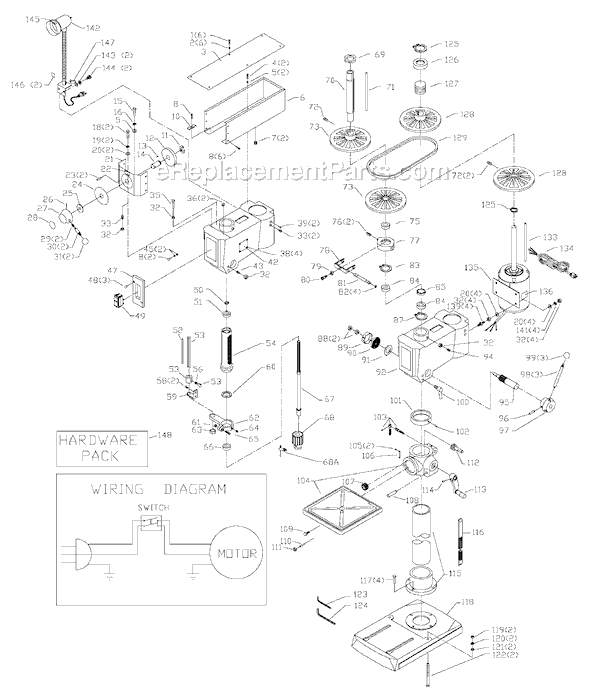
Getting the collar off requires removing the quill. Although not obvious from the exploded parts diagram, this is easily done. First, one undoes the two nuts on the left (as seen from the front) end of the pinion shaft that raises and lowers the quill, and removes the spring assembly in the Chromed housing by hand.
The quill will fall down and hit the table when the pinion shaft handle is removed - don\'t allow this to happen by tightening the quill lock before removing the pinion shaft. Rotate the table to one side, and carefully remove the quill from the drill press. Be careful not to bend the spindle spline shaft.
Unbolt the collar and slide it off the quill. Slide the new collar back onto the quill, being sure to orient it correctly. The rubber ring goes on last, after the collar is installed. Take the hardware off the old collar and install it on the new collar. The rubber ring goes on last. Reinstall the quill in the drill press head, and clamp it with the quill lock. Rotate table back into position, and put a pice of wood on it, just in case. Re-insert the pinion shaft. It will take some rotation and wiggling to get it to go all the way. Re-install the spring, and the two nuts on the pinion shaft. Adjust nuts such that there is just enough clearance for easy rotation of the pinion shaft while raising and lowering the quill.
Screw rod into collar, and only then tighten the collar to the quill. Install lock nut.
While the quill is out on the bench, it\'s a good time to clean and lubricate everything except the spindle bearings - they are permanently lubricated ball bearings. Grease with Mobil 1 (the red synthetic stuff) from the auto parts store.
The old collar will be re-machined to accept a 1/2-13 stop rod (by turning it down to 3/8 and threading to 24 tpi) and matching 1/2-13 thumb-nuts, as used on the larger Delta drill presses.
Read less
Did you find this story helpful?
Thank you for voting!
< Prev
1
Next >
Model Cross Reference
This part works with the following models:
ERP Number: ERP10328377
Manufacturer Part Number: 904131
This part is in stock in our warehouse and will ship out within 1 business day of the order being placed.
New stock is on the way! On order parts usually ship within 7 business days.
Item is not in stock and usually ships 10-15 business days from the time you place your order.
This item is no longer being made by the manufacturer, and cannot be added to your shopping cart.
✖
Mail-In Recycling Rebate
Some of the parts we sell are eligible for mail-in rebates since we can recycle them. We will display any applicable rebates in your shopping cart. To redeem your rebate, contact Customer Service after you have received your part.