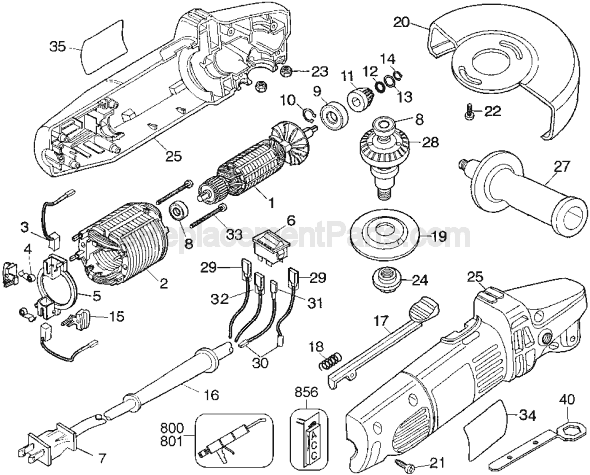
This is a Rocker type switch that has 4 terminals and a compact design for easy installation. This authentic DeWalt replacement part is sold individually. Switches are commonly replaced parts in power tools, handling all on/off and variable speed operations. They also have a role in electric breaking; they can momentarily reverse electrical polarity. Because switches use mechanical internals, they will degrade and wear out over time, eventually needing replacement. Some common signs of a broken or failing switch are: • The tool has stopped functioning • it refuses to start. • The tool operates intermittently, requiring multiple tries to turn on, until eventually it won't start at all. • The variable speed function and electric braking aren't working properly.
Troubleshooting
This part works with the following brands:
Black and Decker
DeWALT
This part works with the following products:
Leaf Blower / Vacuum
★
Customer Part Reviews
?
5.0
Average Rating (out of 5):
★★★★★
★★★★★
(2 Reviews)
Click to filter by ratings:
5 stars
2
4 stars
0
3 stars
0
2 stars
0
1 star
0
< Prev
1
Next >
Sort by:
Sorry, we couldn't find any existing reviews that matched. Try using some different or simpler keywords.
★★★★★
★★★★★
Rocker switch replacement for DeWalt angle grinder
Correct part, exactly as advertised, fixed the tool immediately. Thank you.
David - June 13, 2020
Verified Purchase
★★★★★
★★★★★
exact fit
perfect fit. Put in the new one. My grinder works just like new.
Robert - January 13, 2021
Verified Purchase
Customer Repair Instructions
All our customer repair instructions are solicited directly from other customers just like you who have purchased and replaced this exact part.
Easy
15 - 30 mins
(12 rated repairs)?
< Prev
1
2
Next >
Sort by:
Sorry, we couldn't find any existing installation instruction that matched.
Removed one half of the housing. Removed the cord connections from the switch. Then removed the switch. Take a picture so you can see where all the parts inside are located. You will need to trim the cord wires to the correct length. And i should have ordered the cord terminals. Place the cord protector on the new cord and wire the cord t
... Read moreo the new switch. Then assembly in reverse order.
1. Remove the cover. It\'s put together with torx screws.
2. Pull switch out and remove wire leads. Make sure to take a picture or remember which leads to each plug on the switch.
3. Put the new switch in after connecting the 4 wires.
4. Put the covers back together
5. Plug in and test.
1. Removed screws holding grinder together.
2. Removed electrical switch.
3. Removed wire plugs.
4. Installed wires on new switch
5. Repled switch in grinder
6. Placed both halves together and replaced screws.
7. Tested grinder, works great. Like new.
I removed the screws holding the two halves of my grinder case together and replaced the switch, then reassembled the halves. The brushes were only 1/4 worn, so I did not replace those. The switch was the correct part and it now works perfectly.
Switch was exact same replacement part works fine. Remove 1/2 of the housing, make notes or take a picture to where all the internal parts are located. Remove the wires from the switch and place them on the new switch. Make sure all the parts are in their correct place and attach the housing half.
Took it apart after it stopped working. Checked the switch with a multi meter. It was bad. Ordered the new switch. Took 5-6 minutes to put the new switch in, and it works just fine!
This part is in stock in our warehouse and will ship out within 1 business day of the order being placed.
New stock is on the way! On order parts usually ship within 7 business days.
Item is not in stock and usually ships 10-15 business days from the time you place your order.
This item is no longer being made by the manufacturer, and cannot be added to your shopping cart.
✖
Mail-In Recycling Rebate
Some of the parts we sell are eligible for mail-in rebates since we can recycle them. We will display any applicable rebates in your shopping cart. To redeem your rebate, contact Customer Service after you have received your part.