Removed source of energy (unplugged the planer from outlet) before working on machine.
1. Removed plastic safety cover.
2. Removed C clip then sprocket and chain.
3. Removed gear box cover.
4. Carefully removed necessary gears noting all washers and placement.
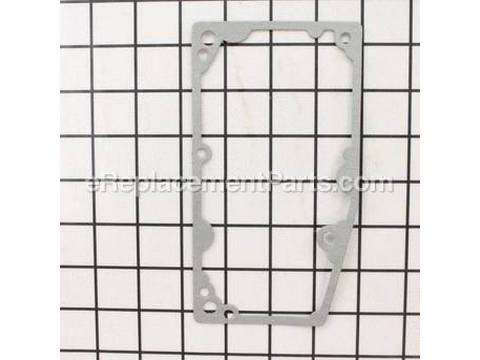
5. Remove shim/gasket and cleaning up any peices
... Read moreleft on gear box and cover.
6. Put new shim/gasket in place.
7. Replaced cover.
8. Replaced chain washer and sprocket.
9. Replaced c clamp
10. Replaced plastic guard
11. Turned planer on, ran good!
Talked to DeWalt repair center and explained my problem. Tech and I agreed problem was more than likely faulty roller bearings. Ordered those from him and when they arrived, after tearing planer down to the point of being able to remove the old bearings, found out that one of the feed roller sprockets had also broken. If I had done thi
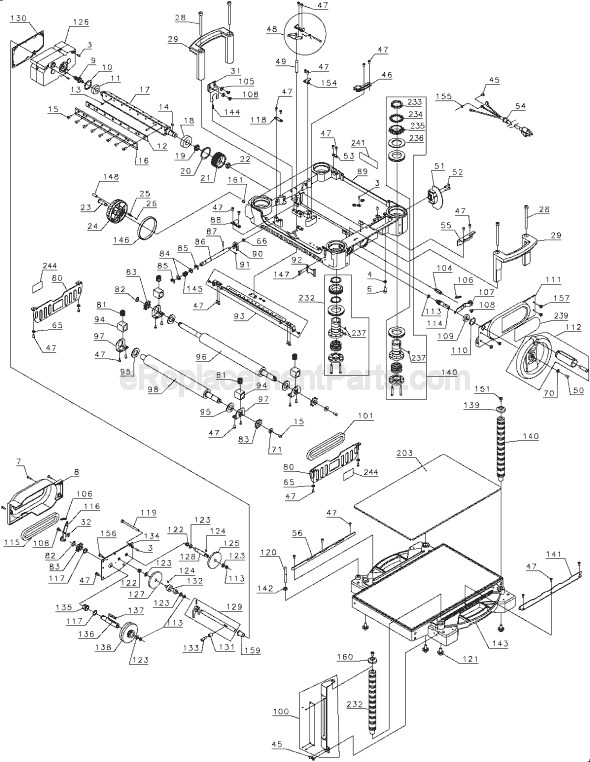
... Read mores tear down first before just blindly ordering the bearings, I would have had all the parts I needed at one time. Because I did not have the foresight to do this, I had to wait the additional time before getting the new sprockets. I replaced all four sprockets instead of just the broken one. It\'s easy to do and I wanted the peace of mind that all of the damaged parts connected to the feed rollers were brand new. I think what caused the whole problem in the first place was running a rough sawn board through the planer that had a hidden screw head embedded in it. The screw put two nicks into all three cutting blades (I ran the board through the planer twice before realizing what was happening). All the boards I ran through the planer after that blunder had two raised ridges on their surfaces where the blades were nicked. This in turn caused the boards to begin feeding through the planer at a diagonal, instead of straight in. I tried to correct that by pushing against the end of the board at the feed end. The added pressure on the cutting blades and feed rollers caused the bearings on both ends of both rollers to begin to be cut out internally (the bearings are cube shaped pieces of of a softer metal than the roller ends with a round receiving hole milled into them) and this action quickly wore out an elliptical grove inside the bearings and caused the rollers to rotate unevenly and eventually become jammed into the bearings. It was kind of like driving a car with the emergency brake on. The force of the rollers suddenly coming to a dead stop also snapped the retaining tab off of the damaged sprocket. This is all a guess on my part but seems plausible. At any rate, once I had all the replacement parts, the repair went smoothly. You will need a pair of snap ring pliers to remove the snap rings on one side of both rollers. The hex head wrench that comes with the planer removes most of the screws to effect the repair. A slightly smaller sized one is needed for a few screws further into the repair. A #2 Phillips head screwdriver takes out the rest of the screws. Download the PDF exploded view of the planer you have; it shows you where everything goes and it is very self explanatory. Grease all four feed roller ends before placing them into the bearing holes. Before doing this particular repair, turn your planer upside down on your workbench. The reason for this is that the bearing \"cubes\" are held in place with small springs that are next to impossible to hold in place while simultaneously attempting to screw down the small plates that hold the springs tight against the bearings if the planer is right side up. If you replace the bearings, pay attention to how the originals were seated. There is an embossed line on one side of the bearing cube. The new bearing needs to be placed with the line side exactly in the same location as the old bearing. This seems to be because the drilled hole in the bearing is not exactly centered in the end of the cube. Pay attention to this part of the repair as I believe it could cause future bearing failure if not followed. Ask your local tech about this. When you remove the sprockets from both ends of both rollers, one side is held on by #2 Phillips head screws, the other side by snap rings. The chain going around the sprockets (looks like a bicycle chain or a chainsaw chain) will go back on much easier if you put it on the sprockets and then insert the sprockets back onto their spindle posts at the same time. Line up the interior tabs on the sprockets with the grooves cut into the spindle posts and they should push easily into place. If you have to replace your cutting blades like I did, do this repair with the planer in the upright position. The blades are easy to get to and are double sided so you get two chances per blade to damage them with a hidden screw! They are sharp as hell so handle with care. Take your time, place all your parts in relevant piles, use the PDF as a guide, put on some good music and you too will have the satisfaction of fixing your own expensive toys. Good luck.
Read less
Did you find this story helpful?
Thank you for voting!
< Prev
1
Next >
Model Cross Reference
This part works with the following models:
ERP Number: ERP10176227
Manufacturer Part Number: 5140011-28
This part is in stock in our warehouse and will ship out within 1 business day of the order being placed.
New stock is on the way! On order parts usually ship within 7 business days.
Item is not in stock and usually ships 10-15 business days from the time you place your order.
This item is no longer being made by the manufacturer, and cannot be added to your shopping cart.
✖
Mail-In Recycling Rebate
Some of the parts we sell are eligible for mail-in rebates since we can recycle them. We will display any applicable rebates in your shopping cart. To redeem your rebate, contact Customer Service after you have received your part.