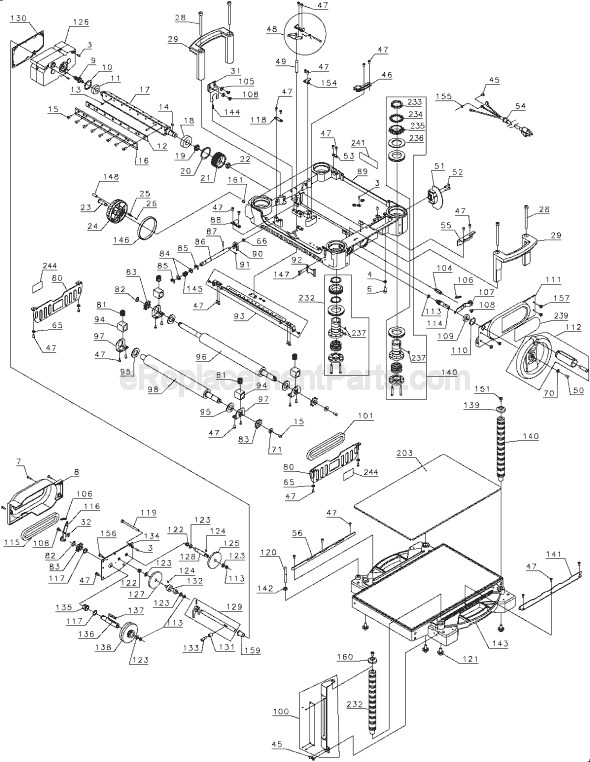
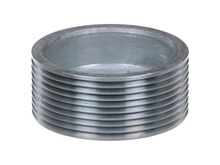
This is an authentic DeWalt replacement part that has been sourced from the original manufacturer to be used with planers. The metal nut assembly is used to secure the pulley to the end of the cutting head assembly. This item is available as an individual replacement part.
I had to pull the old pulley, file some rough marks from the shaft, install the new key and retainer nut, then install the new belt.. This required removing the chain that drives the feed rollers first.
The whole process took less than 30 minutes and was easily accomplished. The most challenging part was getting the new belt to str
... Read moreetch enough to fit over the new pulley and align properly with the drive pulley on the motor.
First unplug from power outlet.
Remove necessary panels/covers to gain access to drive belt.
Install new belt on smaller pulley, slide a portion of the belt on the upper edge of the larger pulley, turn the large pulley counterclockwise using a socket wrench while holding pressure on the belt at the large pulley, the belt wil
... Read morel stretch enough to slip on the pulley as it turns. Keep turning the larger pulley and applying pressure on the belt until it centers itself on the pulley.
DW735 Dewalt Planer
Read less
Did you find this story helpful?
Thank you for voting!
The drive belt got chewed up cause the pulley retaining nut somehow worked loose and fell off machine at some point.
I simply ordered the nut from ereplacement parts.com and patiently waited for it to come in the mail. I also replaced the chewed up drive belt after installing the new pulley retaining nut. I used the lug wrench to assist turning the pulley while coaxing the drive belt on. That part was a bit more challenging! You just work the belt on a
... Read morelittle at a time while rotating the bigger pulley with the lug wrench. You can also use correct socket and drive wrench.
Remove side cover , remove chain, tensioner, and sprocket\' remove nut and belt\' then remove pulley. go back together in revierce order with new pulley.
Did you find this story helpful?
Thank you for voting!
Pulley had come loose after nut fell off. Ruined those parts and the key
Followed the directions online at eReplacements. The difficult part was getting the new drive belt onto the pulleys. It was harder than it appeared in the video.
Did you find this story helpful?
Thank you for voting!
I viewed a few YouTube videos before attempting the repair. The nut on the blade cylinder fell off and the drive belt was damaged.
1. Removed motor side cover and top cover.
2. Removed the drive chain tension arm and front chain sprocket and chain.
3. Removed the damaged belt and checked for damage on the blade cylinder sprocket.
4. Installed new nut holding the sprocket.
5. Installed new belt and mounted the chain and sprocket.
6. Attac
... Read morehed the chain tension arm.
7. Installed the side cover
8. Installed new cutting blades.
Everything fit and the machine was as good as new!
Read less
Did you find this story helpful?
Thank you for voting!
< Prev
1
Next >
Model Cross Reference
This part works with the following models:
ERP Number: ERP10176135
Manufacturer Part Number: 5140010-23
This part is in stock in our warehouse and will ship out within 1 business day of the order being placed.
New stock is on the way! On order parts usually ship within 7 business days.
Item is not in stock and usually ships 10-15 business days from the time you place your order.
This item is no longer being made by the manufacturer, and cannot be added to your shopping cart.
✖
Mail-In Recycling Rebate
Some of the parts we sell are eligible for mail-in rebates since we can recycle them. We will display any applicable rebates in your shopping cart. To redeem your rebate, contact Customer Service after you have received your part.