Part Location Diagram of N031652 DeWALT BRUSH
See part 3 in the diagram
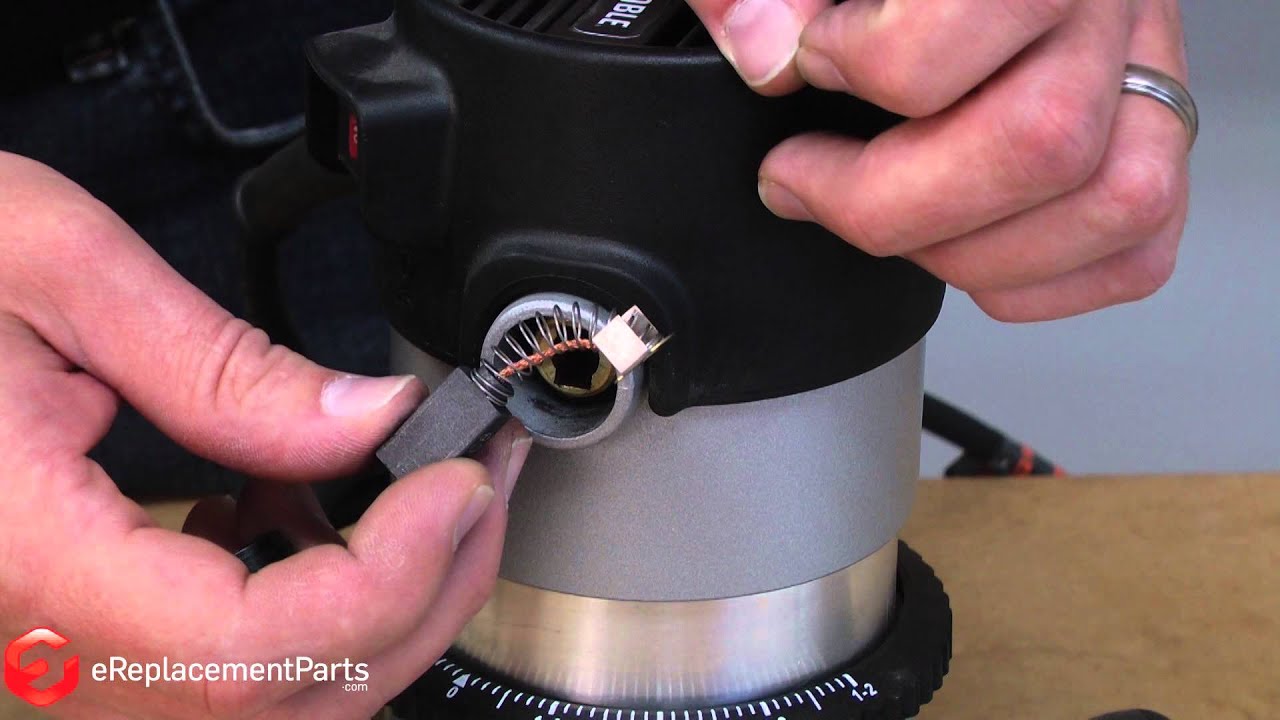
Replacing your Porter Cable Router BRUSH
( Grid squares measure 1x1 inch )

BRUSH N031652

Manufactured by:
DeWALT
ERP Number:
ERP18993190
Part Number:
N031652
Original Equipment Manufacturer ?
In Stock
Delivers in 3-5 Business Days!

Easy 

Less than 15 mins 

(26 rated repairs) ?

Does this part fit my model?

Need help finding your model number?

Product Description

?

This brush is a genuine Porter-Cable replacement part, not generic. As pictured, this brush is ready to install and includes carbon brush, wire lead, and spring. This item is sold individually. Over time, brushes will wear down and eventually require replacement. This brush will fit the models listed in the 'Compatibility' section below. It is not guaranteed to fit any other power tool models. • Worn brushes are often the cause of a poorly running motor • Replacing brushes can fix an intermittent motor • New brushes can restore a motor’s electric braking Carbon motor brushes are one of the most commonly replaced power tool components. Because carbon brushes are wear items, meaning that through friction and use they will gradually wear away, they will eventually require replacement. Worn brushes are common causes of intermittent motor function, reduced electric braking, and reduced motor power. A worn out brush will often be worn down near the wire lead and may be cracked, pitted, or burned. When replacing carbon brushes, be sure to also inspect your armature for burns, cracks, or other damage which indicates a larger motor problem.

Frequently Purchased Together

?

Troubleshooting

This part works with the following brands:
  • Porter Cable
  • DeVilbiss
This part works with the following products:
  • Router
  • Sander Polisher
Part# N031652 replaces these:
N031652, PN031652,

Videos For installing this part.

?
Replacing your BRUSH

Customer Part Reviews

?
4.8
Average Rating (out of 5):
★★★★★
★★★★★
(21 Reviews)
Click to filter by ratings:
  • 5 stars
    20
  • 4 stars
    0
  • 3 stars
    0
  • 2 stars
    0
  • 1 star
    1
  • 1
  • 2
  • 3
Sort by:  
Sorry, we couldn't find any existing reviews that matched. Try using some different or simpler keywords.
  • 1
  • 2
  • 3

Questions & Answers

?

Our customer Service team is at the ready daily to answer your part and product questions.

Be the first to ask our experts a question about this part!

Ask our Team

We have a dedicated staff with decades of collective experience in helping customers just like you purchase parts to repair their products.

Does this fit my product?

Customer Repair Instructions

All our customer repair instructions are solicited directly from other customers just like you who have purchased and replaced this exact part.

Easy 

Less than 15 mins 

(26 rated repairs) ?
  • 1
  • 2
  • 3
Sort by:  
Sorry, we couldn't find any existing installation instruction that matched.

Worn brushes needed replacement.

Anthony from Rochester Hills, Michigan

7 of 7 people found this instruction helpful.
Difficulty Level:
Easy
Total Repair Time:
Less than 15 mins
Tools:
Screw drivers
Parts Used:
N031652
Removed the brush caps with a screwdriver, then removed the worn brushes. Then I blew out the motor with my compressor. Then installed the new brushes and screwed the brush caps back on. Saw works like new!
Did you find this story helpful?
Thank you for voting!

Broken brush caps, and worn brushes

Blake from Somerville, Massachusetts

4 of 4 people found this instruction helpful.
Difficulty Level:
Difficult
Total Repair Time:
Less than 15 mins
Tools:
Screw drivers
Parts Used:
N031652, 803483
Remove the broken brush caps and the worn brushes
Install the new brushes, then screw in the new brush caps
Did you find this story helpful?
Thank you for voting!

Had tabs on the brushes itself which are not needed on my circular saw

Greg from Flint, Michigan

3 of 3 people found this instruction helpful.
Difficulty Level:
Easy
Total Repair Time:
Less than 15 mins
Tools:
Screw drivers
Parts Used:
N031652, 803483
Removed the tabs with the tin snips, inserted the brushes, put brush cap on and tightened.
Original brush cap fell out and caused the circular saw not to have full power.
Did you find this story helpful?
Thank you for voting!

Replace brushes in Porter Cable Router.

Richard from Georgetown, Texas

3 of 3 people found this instruction helpful.
Difficulty Level:
A Bit Difficult
Total Repair Time:
15 - 30 mins
Tools:
Screw drivers
Parts Used:
N031652, 803483
Remove the old brush caps with a screw driver, then remove the brushes. Install the new brushes in the brush holders Challenge getting the brush assembly to stay \" down\" or \"in\" until the new brush caps can get placed properly to engage threads. Persistence paid off.
Did you find this story helpful?
Thank you for voting!

Bought Porter Cable 690 Series router \"at an auction that \"wouldn\'t start\".

Mark from COLUMBIA, Missouri

1 person found this instruction helpful.
Difficulty Level:
Easy
Total Repair Time:
Less than 15 mins
Tools:
Screw drivers
Parts Used:
N031652, 803483
Saw a 690 Series Porter Cable router at an auction that wouldn\'t start. Noticed that it was missing carbon brushes and caps. Replaced them and boom, it started. Thus, was able to get a router, plunge router accessory, and another adjustable base for $80.00. Was able to use your site to identify the correct replacement parts, install them and obtain an excellent tool for a boat load of savings.
Did you find this story helpful?
Thank you for voting!

Bad brushes

victor from grabill, Indiana

1 person found this instruction helpful.
Difficulty Level:
Easy
Total Repair Time:
Less than 15 mins
Tools:
Screw drivers
Parts Used:
N031652
Took old ones out, used air hose blew it out and put the new ones in a simple and easy way.
Did you find this story helpful?
Thank you for voting!

Brushes were worn out and cord was partly cut

Bob from CONROE, Texas

1 person found this instruction helpful.
Difficulty Level:
Easy
Total Repair Time:
15 - 30 mins
Tools:
Pliers, Screw drivers
Parts Used:
N031652, N380209
1. Remove the brush caps.
2. Remove the old brushes and install the new brushes.
3. Replace the brush caps.
4. Remove the top motor housing cap.
5. Remove the cord clamp.
6. Remove the cord wires from the switch.
7. Slide the cord relief off of the old cord and put it on the new cord.
8. Attach th e new cord to the switch.
9. Attach the cord clamp.
10. Replace the top motor housing cap.
Did you find this story helpful?
Thank you for voting!

ROUTER QUIT RUNNING

Mike from Hammond, Louisiana

1 person found this instruction helpful.
Difficulty Level:
Easy
Total Repair Time:
Less than 15 mins
Tools:
Screw drivers
Parts Used:
N031652
UNSCREW BRUSH CAPS /PULL OLD BRUSHES OUT /BLOW OUT OLD DUST /PUT NEW BRUSHES IN /SCREW CAPS BACK IN & IT IS DONE
Did you find this story helpful?
Thank you for voting!

Brush cap broke

Robert from NEW BEDFORD, Massachusetts

0 of 1 people found this instruction helpful.
Difficulty Level:
Easy
Total Repair Time:
Less than 15 mins
Tools:
Screw drivers
Parts Used:
N031652, 803483
Replaced carbon brush and brush cap.
It literally took longer to order the parts than it took to complete the repair.
Did you find this story helpful?
Thank you for voting!

Router wouldn\'t start.

Erwin from RIVER FALLS, Wisconsin

0 of 1 people found this instruction helpful.
Difficulty Level:
Easy
Total Repair Time:
Less than 15 mins
Tools:
Screw drivers
Parts Used:
N031652
Got a switch, put it in, brushes sparked, replaced brushes it works now.
Did you find this story helpful?
Thank you for voting!
  • 1
  • 2
  • 3