




eReplacementParts iPhone and Mozilla Integrated Search Apps.
1. Click this link for an Installation Page
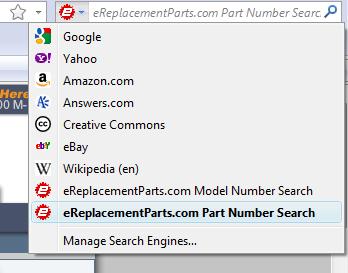
Once on the installation page, click the "eReplacementParts.com--Model Number" and "...Part Number" links in the middle of the page. This will automatically install each eReplacementParts.com search feature into your Firefox search bar.
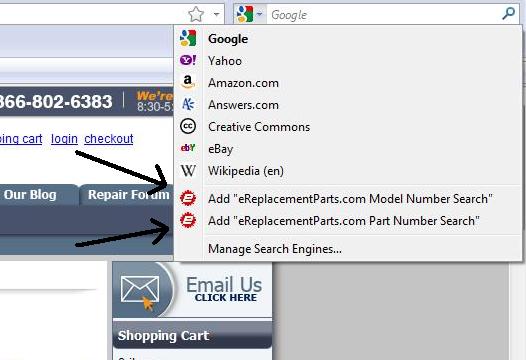
2. You can add our search features to your Firefox search bar by navigating to our Home Page, and then installing them in the browser.
Once on our home page, click the drop-down tab on your integrated search bar in Firefox and add the search features by clicking them:
1. Click this link for an official iPhone Apps Download Page.
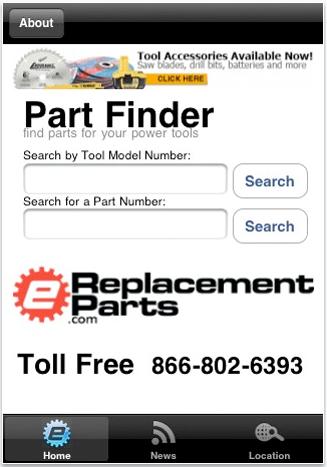
Once you're on the page, download and install the application as appropriate.
2. You can also download the new application through your iPhone. Just go to your iPhone's "App Store" in the phone's menu. Search "ereplacementparts" in the App Store, and the search tool download will appear.
Now you have the power of our tool and equipment parts database and streamlined ordering system at your disposal no matter where you are! Use these new search tools to get the most out of eReplacementParts.com's industry-oriented services, and make us your professional parts warehouse.
WRITTEN BY
EREPLACE CONTENT TEAM
Comprised of creative, experienced video producers, writers, and graphic designers, the eReplacementParts.com Content Team is focused on using their diverse knowledge base to create high-quality informative content to achieve our simple mission: Help the world fix things. Whether it be through tips, guides, or hacks, we ensure that every piece of content includes only expert knowledge, to guarantee that you can do the job right the first time!