



How to Replace the Power Cord on a DeWALT Angle Grinder (Model D28402)

If broken parts and faulty starts are grinding on your nerves, it's time to face the fix. Whether you are a grinding pro or seasonal grinder, eReplacementParts.com provides the parts, procedures and facts you need to fearlessly fix what fails you.
Power cords take a lot of abuse. As soon as damage to your cord is noticed, it should be replaced. Most forms of damage (such as nicks and cuts along the insulation) can by identified by visually inspecting the power cord each time the grinder is used. The plug should also be inspected for missing or damaged prongs. Less visible (but more obvious) symptoms of a damaged power cord include sparking, arcing, blown fuses, or power disruptions of any kind (during use).
Are you ready to pull the plug on your DeWALT angle grinder? This article will show you how to complete the repair quickly and easily. Let's get started.

REMOVING THE POWER CORD [top]
1. Remove the top half of the handle assembly.
Remove the (5) retaining screws.

Remove the top half of the handle assembly.

2. Separate the handle from the field case.
Remove the paddle assembly.

Remove the lock-on button assembly.

Separate the rear housing from the front.

3. Remove the cord clamp.
Remove the clamp retaining screws.

Remove the cord clamp.

4. Remove the power cord.
Lift the cord and switch assembly out of the handle.

Remove the screws connecting the cord to the switch.

Remove the power cord from the grinder.
PREPARING THE NEW POWER CORD [top]
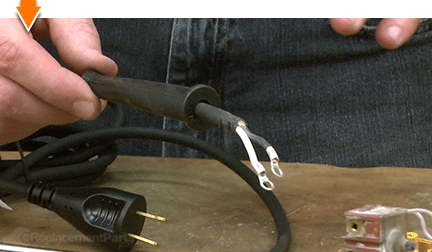
5. Trim the new cord wires.
Align the two power cords (old and new) at the point where the insulation ends.

Align the two white wires; cut the new white wire to the length of the old (compensate slightly for the length of wire inside the old terminal).

Align the two black wires; cut the new black wire to the length of the old (compensate slightly for the length of wire inside the old terminal).

6. Install the new terminal ends.
Use wire strippers to strip approximately one-quarter inch from each of the new cord wires.

Twist the ends of the exposed wire sets (separately) to prepare them for installation of the new terminals.

Install the new terminal over the exposed portion of the black wire.

Use a crimping tool to secure the terminal.

Install a new terminal over the exposed portion of the white wire.

Use a crimping tool to secure the terminal.

7. Transfer the cord protector.
Slide the cord protector (strain relief) off the old power cord.

Install the cord protector onto the new power cord.

INSTALLING THE NEW POWER CORD [top]
8. Connect the power cord to the switch.
Align the eyelets with the mounting holes on the switch.

Secure the connections with the screws.

REASSEMBLING THE UNIT [top]
9. Reinstall the cord / switch assembly into the handle.
Reinstall the switch into the handle.

Reinstall the cord and cord protector into the handle.

Tuck the cord wires into the handle.

Reinstall the cord clamp.

Secure the cord clamp (and switch) with the screws.

10. Reconnect the handle assembly to the field case.
Partially connect the lower half of the handle assembly to the field case.

Tuck the wires into the designated slots and channels on the assembly.

Connect the lower half of the handle to the field case (manipulate the two components until they “snap” into place).

11. Reinstall the lock-on button.
One side of the lock-on button contains a small tab. This tab should be installed facing the armature.

Install the lock-on button into the handle.

12. Reinstall the paddle assembly.
Install the paddle assembly into the handle; ensure that the “tail” is positioned above the switch button, and the “fulcrum” is seated within the recess in the handle.

13. Reinstall the top half of the handle assembly.
Partially install the top half of the handle assembly.

Align the posts (on the fulcrum and the lock-on button) with the recesses in the top of the handle.

Before securing the handle with the screws, test the paddle and the lock-on button for proper functionality.

Secure the handle with the screws.


You can't place a value on a job well done, unless you did it yourself. (Which you did.) Now you can place that value back into your own pocket. (Or into your business.) Not only did you refine your grinder at a fraction of the cost of replacement; you have expanded your skills far beyond the daily grind.
Find your next fix here.