



How to Replace the Motor Brush Holders on a Porter Cable Router (690 Series)
Finish Nailer Repair - Replacing the Driver Guide (Ridgid Part # 79004001022)


Running out of patience with a run-down router? It's time to face the fix. Whether you are a master carpenter or a weekend woodworker, eReplacementParts.com provides the parts, procedures and facts you need to fearlessly fix what fails you.
The 690 series router has two brush holders. They are located on either side of the motor. The holders serve two main functions: 1) Holding the motor brushes in place, and 2) Transferring power from the wires to the actual brushes. Brush holders are typically damaged when the motor is overloaded. Such situations can cause the end of the brush holder (nearest the armature) to melt.
This article provides step-by-step instructions for removing and installing the brush holders on a Porter Cable 690 series router.
Let's get started.

REMOVING THE BRUSH HOLDER [top]
1. Separate the motor from the base.
Open the clamp (using the clamp knob).

While holding the power unit, rotate the base CLOCKWISE until the lower pin in the motor housing is disengaged from the groove in the base.

Lift the power unit free from the base assembly.

2. Remove the motor housing cap.
Remove the (2) screws from the motor housing cap.

Remove the motor housing cap from the motor unit.

3. Remove the motor brushes.
Use a large screwdriver to loosen the brush cap.

Remove the brush cap.

Remove the motor brush.

Repeat this step to remove the second motor brush.

4. Separate the power unit from the case.
Use a marker to draw a line across the intersection of the power unit and the front case. This mark will be used in later steps to help realign and reassemble the router.

Remove the (2) retaining screws from the power unit.

Use a rubber mallet to tap the power unit until it breaks free from the case.

Separate the power unit from the front case.

5. Remove the brush holder.
Use an Allen wrench to loosen the set screw (located on the motor housing above the brush holder).

Use a small screwdriver to disengage the coiled wire lead from the brush holder (the coiled wire should slide smoothly out of the metal groove and away from the brush holder).

Remove the shield from the brush holder.

Pass a large screwdriver through the opening in the brush holder OPPOSITE the one you are removing. Position the blade of the screwdriver against the inner rim of the holder you are removing.

Tap the end of the screwdriver with a rubber mallet until the brush holder breaks free from the housing.

Repeat this step to remove the second brush holder (as necessary).

INSTALLING THE NEW BRUSH HOLDER [top]
6. Install the brush holder.
Install the new brush holder into the motor housing. The threaded portion of the holder should face away from the motor.

Use a screwdriver and rubber mallet to tap (and seat) the brush holder into the motor housing. “Pounding” the brush holder too deeply into the motor housing may cause damage to the plastic flange on the holder. (Tap the holder lightly into position until it stops.)

Insert a large screwdriver into the slot of the brush holder and rotate the assembly until the slot of the brush holder aligns VERTICALLY with the router.

Tighten the set-screw to secure the new brush holder.

Repeat this step to install the second brush holder (as necessary).

REASSEMBLING THE UNIT [top]
7. Reconnect the brush wire and shield.
Install the shield onto the brush holder.

Install the coiled wire lead onto the brush holder; ensure that the coiled wire is seated in the groove around the brush holder.

8. Reconnect the power unit to the case.
Slide the armature (in the motor case) through the field (in the power unit).

Rotate the components as necessary to align the reference marks (made earlier) on the case and the power unit.

Secure the power unit to the case with the (2) screws.

9. Reinstall the motor housing cap.
Inspect the wiring around the power unit for potential “pinch points.” Adjust the wires as necessary.

Install the motor housing cap onto the power unit.

Secure the motor housing cap with the (2) screws.

10. Reinstall the motor brushes and caps.
Slide the motor brush into the brush holder.

Align the tabs on the motor brush with the slots on the brush holder and compress the brush (spring) into the holder.

Continue holding the compressed motor brush in place with one finger.

Carefully slide the brush cap into position over the compressed motor brush (as you remove your finger from the end of the brush). You may have to attempt this step a few times to get it right. The goal is to install the brush cap without allowing the tabs of the compressed motor brush to spring out of the slots in the brush holder.

Use a large screwdriver to secure the brush cap (do not overtighten).

Repeat this step to install the remaining motor brush and cap.

11. Reconnect the motor unit to the base.
Set the motor unit into the base.
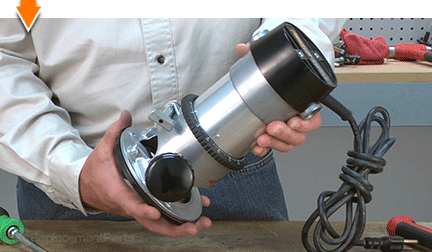
Rotate the base COUNTERCLOCKWISE until the upper guide pins motor are set in the groove of the base.

Tighten the clamp to secure the unit.


Dovetails. Rabbets. Dados. Grooves: The possibilities are as priceless as machines that create them. But you don't have to be a carpenter to cut out the middle-man. Repairing your own powered equipment is easy and economical when you follow our step-by-step guides. Not only did you restore your router at a fraction of the cost of replacement; you built on your ability to face the next fix, whatever it may be.
Find your next fix here.