



How to Replace the Switch on a DeWALT Cordless Drill
Finish Nailer Repair - Replacing the Driver Guide (Ridgid Part # 79004001022)


Glitch in your switch? It's time to face the fix. Whether you are a master carpenter or an occasional drill-seeker, eReplacementParts.com provides the parts, procedures and facts you need to fearlessly fix what fails you.
In addition to providing basic on/off functionality, the VSR switch provides variable speed control of the drill's motor, and allows you to change the direction of rotation. The most common symptom of a faulty switch is that the drill no longer turns on or off. You may also lose some (or all) of the variable speed functionality; as well as the ability to change from forward to reverse.
Sometimes, the switch will actually burn and you'll see (or smell) smoke coming from the drill housing.
This article provides step-by-step instructions for removing and installing the VSR switch on a DeWALT cordless hammer drill.
Let's get started.

REMOVING THE SWITCH [top]
1. Remove the battery.
Remove the battery from the drill.
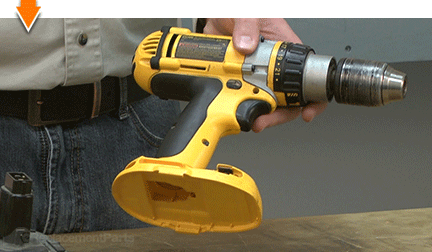
2. Remove the end cap.
Remove the (4) screws from the end cap.

Remove the end cap from the drill.
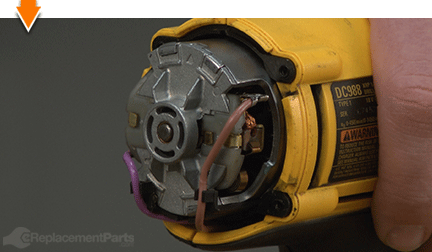
3. Remove the gear case assembly.
Remove the (4) screws from the gear case assembly.

Separate the gear case assembly from the motor housing.

4. Remove the top half of the clamshell (housing).
Remove the (5) screws from the clamshell assembly.
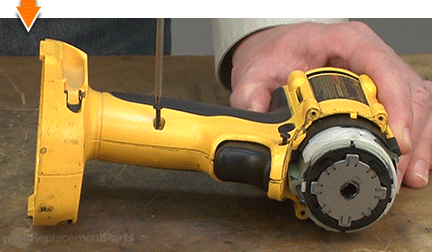
Lift the top half of the clamshell (housing) away from the lower half.

5. Remove the switch.
Disconnect the wire leads from the terminals on the brush holders (one on each side of the motor).

Lift the switch assembly away from the housing.

Remove the selector switch from the housing.

INSTALLING THE NEW SWITCH [top]
Over the years, the switch has changed part numbers many times. Each time, a slightly different switch assembly is used. This switch kit includes new wire leads and a new forward/reverse selector. Make sure to use all the parts included with this kit, so that these components remain compatible.

6. Install the switch.
Install the new selector switch into the housing. The three tabs should be facing the switch assembly.

Align the tabs of the selector switch with the lever on the new switch assembly and install the switch assembly into the housing.

REASSEMBLING THE UNIT [top]
7. Reinstall the wire leads.
Connect the wire leads to the terminals on the brush holders (one on each side of the motor).
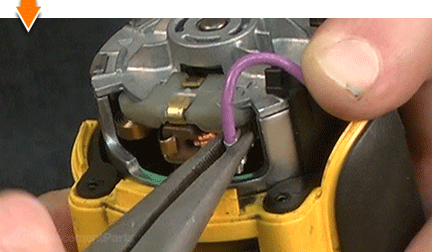
Tuck the wires into the clips on the wire guide.

8. Reinstall the top half of the clamshell (housing).
Install the top half of the clamshell (housing).

Secure the clamshell assembly with the (5) screws.

9. Reinstall the gear case assembly.
Install the gear case assembly.

Rotate the spindle shaft (chuck) until the gear box aligns (snaps into place) with the motor housing.

Secure the gear case to the motor housing with the (4) screws.

10. Reinstall the end cap.
Install the end cap.
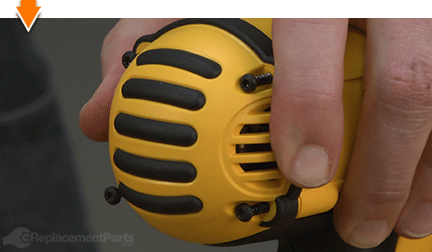
Secure the end cap with the (4) screws.

11. Reinstall the battery.
Install the battery.


As you just learned, fixing things yourself means more drilling with less billing. Hopefully, this article has restored your ability to drill holes without replacing your whole drill. And that's just the tip of the bit. Our online repair guides can help expand your skills far beyond drills; empowering you to face power tool problems whenever they arise; and to fearlessly fix whatever fails you.
Find your next fix here.