



How to Replace the Clamshell (Housing) Set on a DeWALT Drill
Finish Nailer Repair - Replacing the Driver Guide (Ridgid Part # 79004001022)


Housing hammered? It's time to face the fix. Whether you are a master carpenter or an occasional drill-seeker, eReplacementParts.com provides the parts, procedures and facts you need to fearlessly fix what fails you.
The clamshell set is the complete housing assembly for your DeWALT cordless hammer drill. It secures the motor and transmission, provides the drill's grip, secures the switch, and provides the lock-tabs for securing the battery.
Common problems with the clamshell assembly include cracks or damages (usually caused from dropping the drill). Over time, the tabs that secure the battery can wear down or break. When this happens, the battery will no longer fasten securely to the drill. Replacing the clamshell is also an easy way to revitalize the appearance of an otherwise healthy hammer drill.
This article provides step-by-step instructions for removing and installing the clamshell set on a DeWALT cordless hammer drill.
Let's get started.

REMOVING THE CLAMSHELL SET [top]
1. Remove the battery.
Remove the battery from the drill.
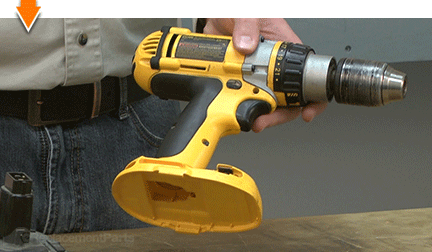
2. Remove the end cap.
Remove the (4) screws from the end cap.

Remove the end cap from the drill.
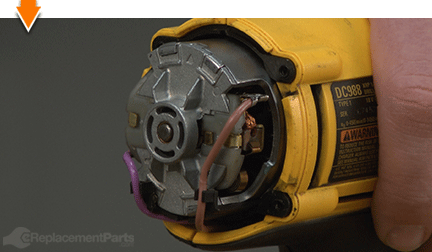
3. Remove the gear case assembly.
Remove the (4) screws from the gear case assembly.

Separate the gear case assembly from the motor housing.

4. Remove the top half of the clamshell (housing).
Remove the (5) screws from the clamshell assembly.
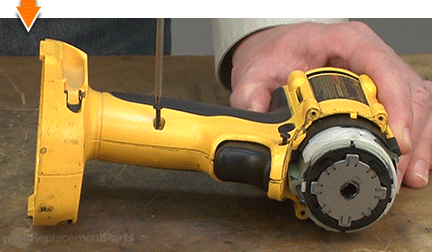
Lift the top half of the clamshell (housing) away from the lower half.

INSTALLING THE NEW CLAMSHELL SET [top]
5. Transfer the internal components.
Place the bottom (empty) half of the new housing on the work table beside the half containing the internal components.

Carefully lift the motor, transmission and switch assembly (as a single unit) away from the old housing.

Install the motor, transmission and switch assembly into the new housing.

Inspect and shift the components (as necessary) seat them within the new housing.

6. Install the top half of the new clamshell (housing).
Install the top half of the new clamshell (housing).

Secure the new clamshell assembly with the (5) screws.

7. Transfer the bit holders.
Use a screwdriver to gently pry (from the inside) the bit holder out of the old housing.

Use long-nosed pliers (as needed) to remove the bit holder from the housing.

Install the bit holder onto the new housing.

Use a large screwdriver to press/seat the bit holder into the housing.

Repeat this step to transfer the second bit holder onto the new housing.

REASSEMBLING THE UNIT [top]
8. Reinstall the gear case assembly.
Install the gear case assembly.

Rotate the spindle shaft (chuck) until the gear box aligns (snaps into place) with the motor housing.

Secure the gear case to the motor housing with the (4) screws.

9. Reinstall the end cap.
Install the end cap.
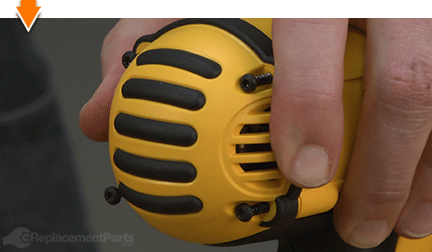
Secure the end cap with the (4) screws.

10. Reinstall the battery.
Install the battery.


As you just learned, fixing things yourself means more drilling with less billing. Hopefully, this article has restored your ability to drill holes without replacing your whole drill. And that's just the tip of the bit. Our online repair guides can help expand your skills far beyond drills; empowering you to face power tool problems whenever they arise; and to fearlessly fix whatever fails you.
Find your next fix here.