Sorry, we couldn't find any existing reviews that matched. Try using some different or simpler keywords.
★★★★★
★★★★★
Great replacement
Nothing is more frustrating than a sander that won't hold onto its sandpaper! This replacement part solved the problem, came quickly and was easlily installed. Thank you Replacementparts.com, you saved the expense of buying a new sander!
Guest - November 11, 2019
Verified Purchase
★★★★★
★★★★★
Quick response, fair price, good product
Got exactly the part I needed and was back to work in no time
Guest - July 8, 2019
Verified Purchase
★★★★★
★★★★★
Easy to replace.
Sander works just like new now. The new pad was simple and extremely easy to replace. It was delivered quickly so I really didn’t lose any work time.
D Ricky - August 20, 2019
Verified Purchase
★★★★★
★★★★★
Exactly the part I needed.
Fast shipping and perfect fit.
Hal - November 15, 2019
Verified Purchase
★★★★★
★★★★★
Sander pad replacement
It was a exact replacement for a 15 year old palm sander. Very pleased
Guest - April 14, 2020
Verified Purchase
★★★★★
★★★★★
Fit perfect
Installed easy sander works great no more flying pads..
Guest - April 7, 2021
Verified Purchase
★★★★★
★★★★★
Always the right part and easy to find!
The pad for my sander arrived quickly and fit perfectly. Thanks fir always having the right part when I need it quickly.
Jack - May 17, 2021
Verified Purchase
★★★★★
★★★★★
I did it!
After searching out my options for the replacement pad for my sander, I found the correct part at a reasonable price on your site. It arrived promply, and my sander is back in business!
Diana - April 25, 2019
Verified Purchase
★★★★★
★★★★★
Exactly what I needed
Part came qucikly, was high quality and worked perfectly.
Mark - April 30, 2019
Verified Purchase
★★★★★
★★★★★
Replaced my sander pad.
The part arrived in a few days and it was the correct part. I was using my sander again in a few days. The cost was reasonable. Thank you!
Guest - November 10, 2022
Verified Purchase
< Prev
1
2
Next >
Customer Repair Instructions
All our customer repair instructions are solicited directly from other customers just like you who have purchased and replaced this exact part.
Easy
Less than 15 mins
(25 rated repairs)?
< Prev
1
2
3
Next >
Sort by:
Sorry, we couldn't find any existing installation instruction that matched.
I replaced the pad with a new one from, eReplacements.com, in just a few minutes, with only a screwdriver. The sander works well now, with the sanding discs adhering to the pad as they should. I have used the sander extensively since repairing it.
I went to the eReplacement web site and found the replacement pad for my sander. It arrived quickly and in great shape.
I removed the old pad from the sander and performed a quick clean up.
Then, using the 4 screws I attached the new pad. This took 5
minutes.
Now my sander keeps the various grit pads firmly a
... Read morettached and my sander works like new!
Replaced old pad with new pad. The new OEM pads are slightly different than the originals. They are not as soft on the surface sanding area. it doesn\'t seem to affect performance but may change how you approach slightly curved surfaces.
Did you find this story helpful?
Thank you for voting!
My hook and loop pad on a Skil orbital sander was worn out and the sanding discs would not hold during sanding. On/off switch protective rubber boot was worn through, which allowed dust to enter the i
1. Removed six star tip screws on the bottom of the hook and loop pad.
2. Removed old worn out pad.
3. Removed four screws that hold left and right portion of plastic casing of the sander together (special long star tip screwdriver required).
4. Gently pulled appart the casing (note location of all components attached to
... Read more the body for correct position and alignment prior to reassembly).
I also gently blew out all the dust collected inside of the sanderÆs body with compressor air.
5. Removed two electrical connectors that attach electrical leads to the switch (marked with a piece of tape for correct position of each wire (2).
6. Pulled a metal spring off the switch that holds the switch in its casing.
7. Replaced the old switch with a new one.
8. Reattached new switch with springs in its casing.
9. Connected (2) electrical connectors to the switch.
10. Alligned new switch and other internal components inside of the sanderÆs casing.
11. Closed the casing and reattached four (4) screws that hold the casing together.
12. Reinstalled new hook and loop sanding pad with six screws to the sander.
13. Tested the sander for its correct operation and finished my project.
This part is in stock in our warehouse and will ship out within 1 business day of the order being placed.
New stock is on the way! On order parts usually ship within 7 business days.
Item is not in stock and usually ships 10-15 business days from the time you place your order.
This item is no longer being made by the manufacturer, and cannot be added to your shopping cart.
✖
Mail-In Recycling Rebate
Some of the parts we sell are eligible for mail-in rebates since we can recycle them. We will display any applicable rebates in your shopping cart. To redeem your rebate, contact Customer Service after you have received your part.



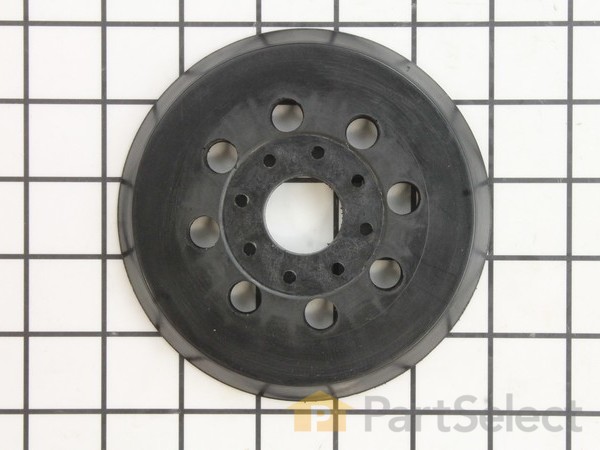
_WW.gif "Part Location Diagram of 2609000750 Bosch Tool PAD")
_WW.gif "Part Location Diagram of 2609000750 Bosch Tool PAD")