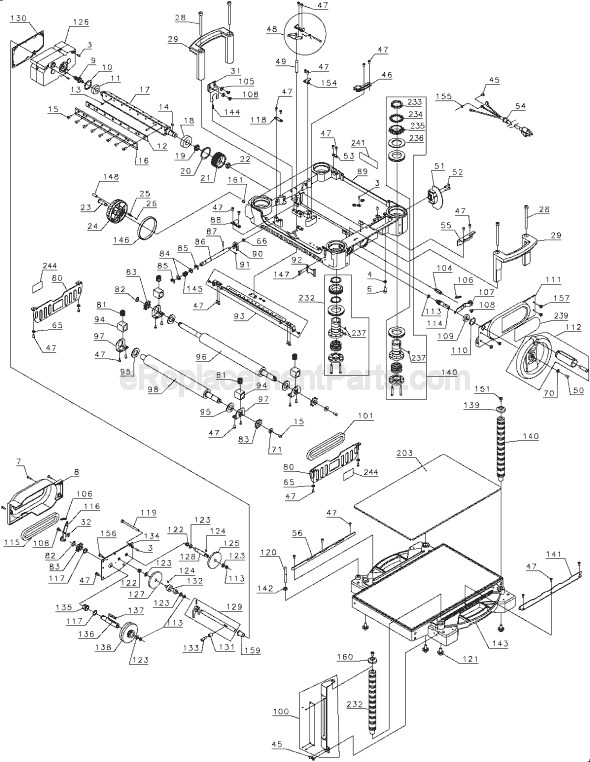
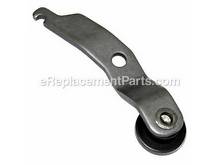
The metal spring connects to the idler shaft and is a genuine item that is supplied directly from the original manufacturer for use with planers made by DeWALT. This part is priced as an individual replacement part. It may become broken and will need to be replaced. A set of pliers and a wrench may be necessary during the replacement of this spring.
DW735 planer not feeding
Parts used:
one new feed roller sprocket (5140010-81),
one new retaining ring (5140010-80), (order two in case one pops off the snap ring plier)
two new springs (5140011-04).
Suggestion: to know how many parts to order, remove both black side covers to determine if one or more bro
... Read moreken sprockets are causing your rollers not to feed. If all is intact, then you have a different cause for the rollers not feeding.
1. Unscrew and remove both black side covers and the yellow top cover that gives access to the dust shroud and blades. Remove the height adjustment wheel to reach the screws securing that side cover. Behind each side cover are two feed roller sprockets, a short chain running between the sprockets, a lever with a wheel on one end that has the purpose of pressing against the chain to keep the chain tracking properly, and a spring on the other end of the lever. In one side compartment, the spring is attached to a horizontal post, and in the other compartment the spring fits into a slot in the metal plate above.
2. On each side, one sprocket is held on the feed roller shaft with a screw and washer, but the other sprocket is held on the shaft with a retaining ring. This retaining ring is round with two tiny holes at each end - it is NOT the \'E\" ring retainer! Remove the retaining rings with a snap ring plyer that has nubs small enough to fit into these tiny holes.
3. After I opened both sides of the planer, of the four sprockets, two on each side, one sprocket was broken into three pieces. The others were not damaged nor particularly worn. I also found in each side one broken spring and one sprung spring.
4. I removed the retaining ring and the broken sprocket, then slid a new sprocket onto the shaft, followed by a new retaining ring. Be sure to seat the ring firmly into the groove on the shaft.
5. I replaced the broken springs on each side. NOTE: before replacing the springs, seat the lever wheel on the chains as follows: on the side with the height adjustment wheel, the lever wheel should track along the TOP of the chain; on the other side, the wheel should track BENEATH the chain.
6. Replace side covers. change or flip blades to a sharper side, if necessary; wax the feed table so lumber will be drawn across the table more easily with less friction, thereby reducing stress on the roller parts.
7. Get a test board, grab your ear bobs, flip the switch on, then enjoy watching your newly repaired planer suck in the board then spit a thinner version out the other end. DONE! And so gratifying to repair it myself.
Remove cover. Remove retainer ring with snap-ring pliers. Replace drive sprocket. Replace snap-ring. Install chain onto drive sprocket. Install tension spring on tensioner arm. Reinstall cover. Power up planer to see drive rollers work.
Took off side covers, removed shredded belt, took off drive chain and chain tensioner, remove driven, the left one, pulley. The hard part was getting the belt onto the pulleys. Put the belt on both pulleys, the left one still off of its shaft. Put a #2 philips thru the center hole of the pulley, insert itGÇÖs tip into the hole at the end
... Read moreof the shaft that the pulley slips onto, and pry to stretch the belt. Youtube has several other methods, but this is the one that worked for me.
This part is in stock in our warehouse and will ship out within 1 business day of the order being placed.
New stock is on the way! On order parts usually ship within 7 business days.
Item is not in stock and usually ships 10-15 business days from the time you place your order.
This item is no longer being made by the manufacturer, and cannot be added to your shopping cart.
✖
Mail-In Recycling Rebate
Some of the parts we sell are eligible for mail-in rebates since we can recycle them. We will display any applicable rebates in your shopping cart. To redeem your rebate, contact Customer Service after you have received your part.
✖
[{"position":0,"name":"Home","title":"Home","url":"/"},{"position":1,"name":"Planer Jointer","title":"Planer Jointer","url":"/parts/power-tool/planer-jointer/"},{"position":2,"name":"Spring or Shock Absorber","title":"Spring or Shock Absorber","url":"/parts/power-tool/planer-jointer/springs-and-shock-absorbers/"},{"position":3,"name":"5140011-04","title":"5140011-04","url":""}]