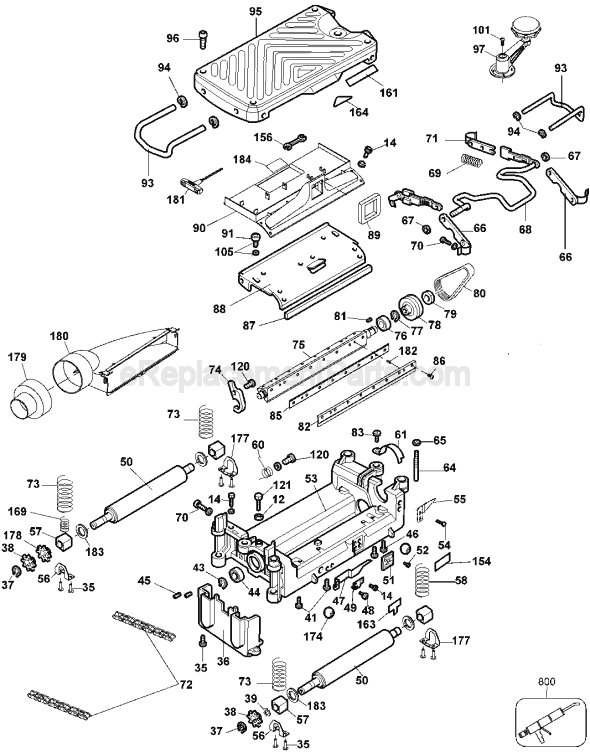
Once I determined what was the problem and got the repair parts the repair just took a little time. The feed was jerking causing the planer to stop and jump at regular intervals. I checked the drive belt which looked fine. I then checked the drive chains which were binding and some links frozen or stiff. I corrected the link problem b
... Read moreut still the problem remained. As soon as I took apart the outboard drive roller the drive side bearing came out in two pieces. There was more time to tear the planer down than to actually fix it. Since I had it apart and it has some age on it I decided to replace all the drive chains, all four bearings and all four washer. Luckily the shaft of the roller wasn\'t damaged so all I needed to do was reinstall all the parts and it ran fine. One note, make sure you put the washer back one with the hard smooth side outward. I installed one incorrectly until I started assembling the other one and realized the error. Only took a few minutes to take the first roller back apart and turn the washers around. This is not a hard job to replace the bearings but time consuming as you have to crank the planer down all the way to take some parts off then crank it all the way up to get access to the bearing screws. You\'ll need four or five tools to disassemble and reassemble. I used a stubby Philips screwdriver as working conditions are tight. I also happened to have a ratchet Philips screwdriver which helped to break some of the screws loose. You will need the snap ring pliers to get the retaining rings off the chain drives and reinstall. The Allen wrench that comes with the planer you\'ll need but also a slightly larger metric Allen wrench, 5mm I think. It\'s doable, just take your time and make sure you pay attention to the disassembly so you remember how to reassemble. Also the bearings go in so the fit is tight. If you rotate it 90 deg it will be loose. Also pay attention to the bearing retaining mounts. One is round holes and one is slotted to allow fitting. Install the round ones first and then put pressure on the other as you assemble to get a good tight fit of the roller with little or no side play. And be careful of the blades as they are exposed. They should be out of the way but easy to let your fingers get in the wrong place and bump them. They are sharp!
Read less
Did you find this story helpful?
Thank you for voting!
< Prev
1
Next >
Model Cross Reference
This part works with the following models:
ERP Number: ERP10176075
Manufacturer Part Number: 5140006-96
This part is in stock in our warehouse and will ship out within 1 business day of the order being placed.
New stock is on the way! On order parts usually ship within 7 business days.
Item is not in stock and usually ships 10-15 business days from the time you place your order.
This item is no longer being made by the manufacturer, and cannot be added to your shopping cart.
✖
Mail-In Recycling Rebate
Some of the parts we sell are eligible for mail-in rebates since we can recycle them. We will display any applicable rebates in your shopping cart. To redeem your rebate, contact Customer Service after you have received your part.