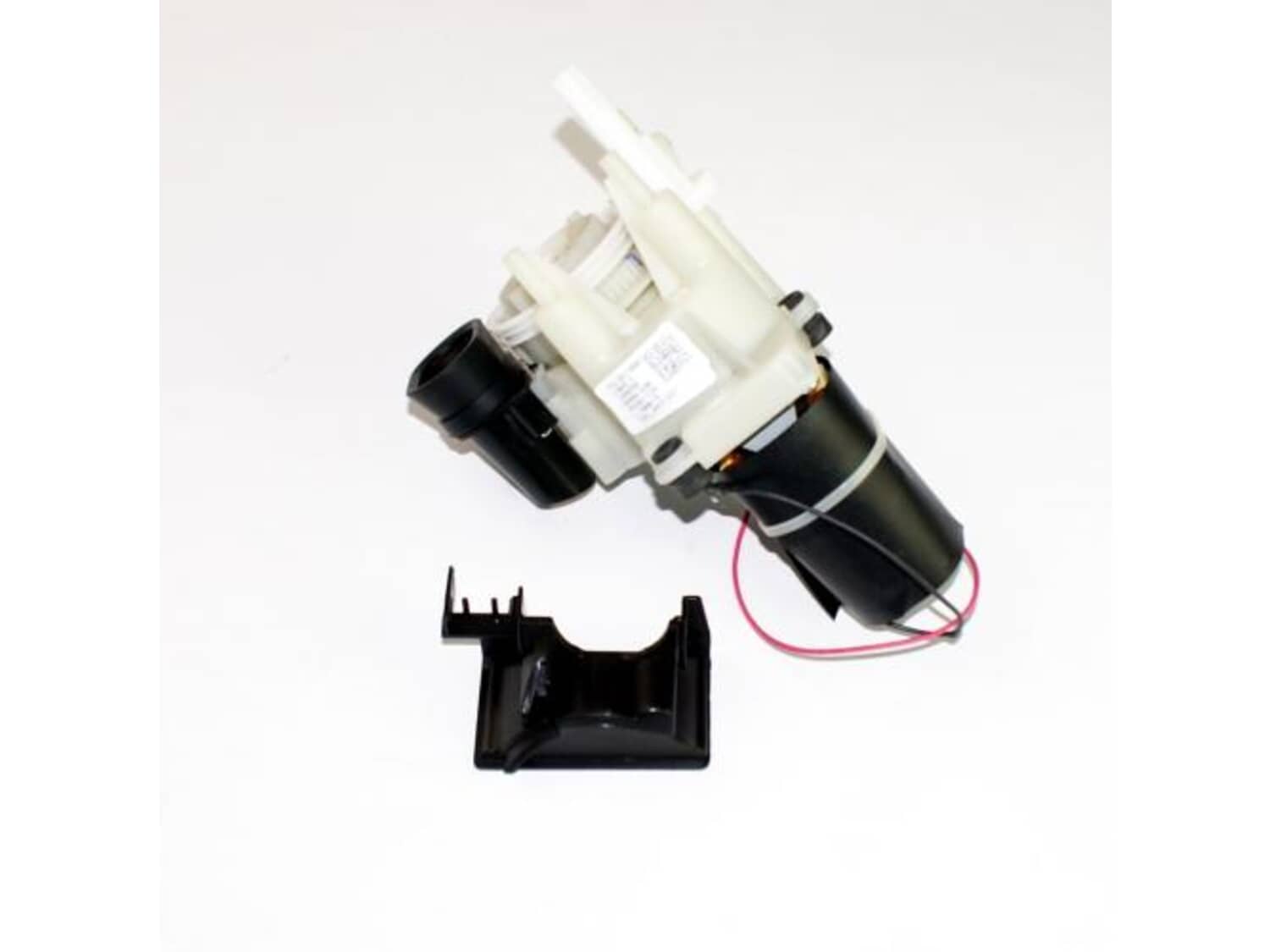
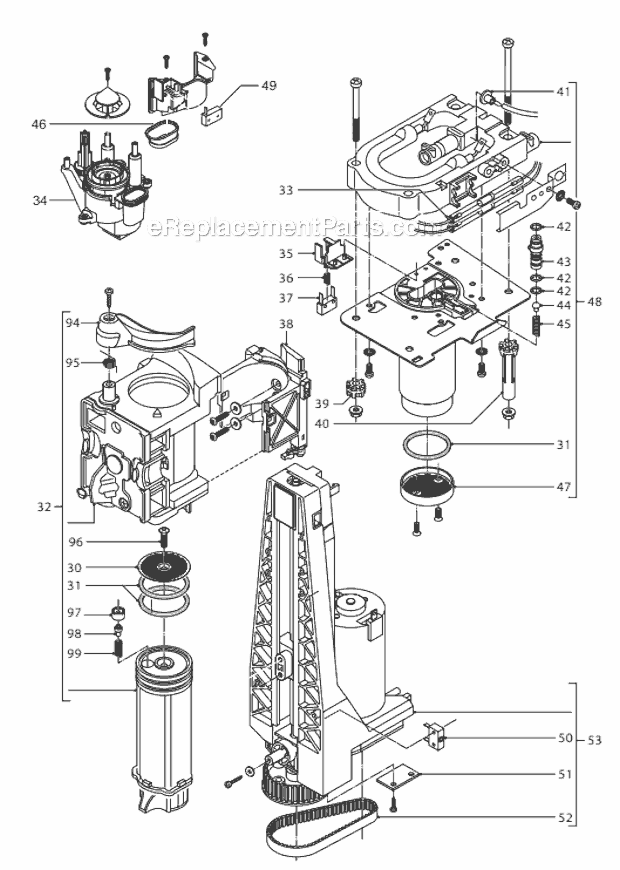
This is an authentic DeLonghi replacement part manufactured for use with espresso and coffee makers. The grinder is a complete replacement part that is used to grind the coffee into grounds. This grinder assembly is available as an individual replacement part, please see model diagram for associative parts.
Troubleshooting
This part works with the following brands:
DeLonghi
This part works with the following products:
Coffee Maker
★
Customer Part Reviews
?
5.0
Average Rating (out of 5):
★★★★★
★★★★★
(2 Reviews)
Click to filter by ratings:
5 stars
2
4 stars
0
3 stars
0
2 stars
0
1 star
0
< Prev
1
Next >
Sort by:
Sorry, we couldn't find any existing reviews that matched. Try using some different or simpler keywords.
★★★★★
★★★★★
Correct part
Replaced the part and it is working perfectly
Guest - June 17, 2020
Verified Purchase
★★★★★
★★★★★
Easy Repair for the grinder
The parts are good quality and everything worked just fine.
Guest - March 23, 2023
Verified Purchase
Customer Repair Instructions
All our customer repair instructions are solicited directly from other customers just like you who have purchased and replaced this exact part.
A Bit Difficult
30 - 60 mins
(3 rated repairs)?
< Prev
1
Next >
Sort by:
Sorry, we couldn't find any existing installation instruction that matched.
Grinder was not grinding enough beans for the coffee ESAM3500N Delonghi Unit
My first attempt included removing the grinder and taking it apart, cleaning and putting together again but that failed to fix the problem so I bought a whole new grinder unit from ereplacement parts.
The hardest part is first figuring out how to remove all the casing after undoing all the visible screws. You don\'t want to
... Read more break the plastic but you need to be firm - note the sides tend to come off easier when slid towards the back since that is how they hook in. After removing the sides and back there a few screws that hold the top down so that also needs removing along with the front panel. The latter needs to be also unplugged from the circuit board for complete removal. All you need is a screwdriver and all the screws are the same size. Finally the black chute where the beans are normally held needs to be removed by the visible screws on top. You also need to use a thin blade screwdriver to lever up the smooth black cap that is in the middle of the grinder bean adjustment knob to get at the screw that holds this knob in place. This is just a cap that is pushed in to hide the screw. At this point you should now have access to the grinder unit that just can be lifted out after unhooking the 2 wires that are connected it to the circuit board. Unhook the wires at the circuit board. Installation is the reverse of the above.
Read less
Did you find this story helpful?
Thank you for voting!
Grinder belt was damaged so it would not grind beans. belt not available to order so i had to order complete grinder
Careful when ordering grinder as there is an Euro model for 240v. The north American model is of course 120v and I believe is noted with a N in the model #.
Did you find this story helpful?
Thank you for voting!
Grinder Not Working (Grinder bearing came unseated we think, caused it to jam)
This repair was actually not as difficult as I anticipated. FYI. I am a handyman and have fixed many electronics before... But I would say that anyone that has a small level of logic and repair capability can do this... no soldering or circuit testing involved. Just screws, unplugging wires, etc is involved. Its fairly easy.
... Read moreBefore starting... Your phones camera is your friend! Always take pictures of your disassembly process at every step possible to remember where things go, or the type of screws that go in the different locations. You can never have too many pictures. You will thank yourself later when you\'re reassembling the machine. This is especially true when you remove wires from the circuit board.
I cant explain exactly how to do the disassembly... We basically just started removing screws in the order we thought we needed to in order to remove the components in order to access the inner parts of the machine. First was removing the sides, top, and back. Then remove the top front panel (buttons and screen). To remove top front panel, you will need to remove screws, AND disconnect a wire ribbon from the circuit board (GENTLY) and wind it through channels in the side of the machine. The front door panel does not need to be removed for this repair.
The grinder assembly removal requires.
To remove the grinder unit, find all the screws holding it and and remove them. You will also need to remove 2 wires from the circuit board that are connected with sleeve push connector clips. You will have to cut 2 tie wraps when doing this. The grinder assembly has a red wire and a black wire.
Diagnosis:
A) We determined that this was the problem bc when we turned on the machine, everything worked except for the coffee bean grinding cycle. Do this test before disassembly... if everything turns on and works, but the only thing that doesn\'t work is that is does not grind the beans when its time, then it might be the grinder assembly.
B) After disassembling the coffee maker and looking at the grinder assembly (and all other parts of coffeemaker), it looked like a couple bearings in the grinding motor became unseated and had jammed the grinder assembly.
C) We also did a visual inspection of all electronics and circuit boards for visible sign of burned out areas (Often, if there is a problem on a circuit board, you can see a black spot that indicates something shorted out or burned out). We did not see any issues with any electronics.
After searching for replacement parts, we noticed that we could purchase the whole grinder assembly, instead of trying to repair or replace the individual parts (bearings, race, motor, etc). We determined that this was the best option because we would be replacing all of the parts that may have also been damaged when the bearings came unseated.
Repair (UNPLUG BEFORE BEGINNING):
1) Disassemble coffeemaker enough to remove grinding unit
2) Replace with new Grinder Unit
3) Reassemble Coffeemaker and test
Good Luck!
Read less
Did you find this story helpful?
Thank you for voting!
< Prev
1
Next >
Model Cross Reference
This part works with the following models:
ERP Number: ERP10313058
Manufacturer Part Number: 7313216831
This part is in stock in our warehouse and will ship out within 1 business day of the order being placed.
New stock is on the way! On order parts usually ship within 7 business days.
Item is not in stock and usually ships 10-15 business days from the time you place your order.
This item is no longer being made by the manufacturer, and cannot be added to your shopping cart.
✖
Mail-In Recycling Rebate
Some of the parts we sell are eligible for mail-in rebates since we can recycle them. We will display any applicable rebates in your shopping cart. To redeem your rebate, contact Customer Service after you have received your part.