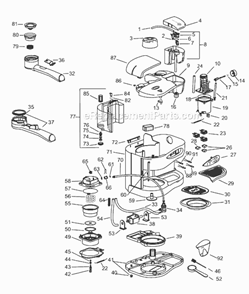
1. Remove coffee drip tray
2. Remove plastic rests for coffee drip tray
3. Remove 2 Philips screws
4. Turn machine upside down, remove 2 Philips screws
5. Remove black plastic base of the unit
6. Remove tamper
7. Remove 3 torx screws surrounding the group head which connect to the top of the unit
... Read more8. Remove 2 small philips screws on back of unit
9. Remove top of unit
10. Remove plastic button plate
11. Remove buttons
12. Disconnect button switch leads
13. Remove old button switch by depressing plastic tabs on sides of switch and pushing forward through the unit
14. Install new button switch and reassemble in reverse order (starting with step 12. connecting leads,)
Read less
Did you find this story helpful?
Thank you for voting!
< Prev
1
Next >
Model Cross Reference
This part works with the following models:
ERP Number: ERP10310386
Manufacturer Part Number: 5132100700
This part is in stock in our warehouse and will ship out within 1 business day of the order being placed.
New stock is on the way! On order parts usually ship within 7 business days.
Item is not in stock and usually ships 10-15 business days from the time you place your order.
This item is no longer being made by the manufacturer, and cannot be added to your shopping cart.
✖
Mail-In Recycling Rebate
Some of the parts we sell are eligible for mail-in rebates since we can recycle them. We will display any applicable rebates in your shopping cart. To redeem your rebate, contact Customer Service after you have received your part.