Sorry, we couldn't find any existing reviews that matched. Try using some different or simpler keywords.
★★★★★
★★★★★
Great Service
The part I replaced worked great. I’ll definitely use this service again!
Guest - May 3, 2019
Verified Purchase
★★★★★
★★★★★
Part made it easier to repair
The part was just like the original so it made it easier to repair. Getting into the Breville Oven and fitting the part in the proper place was not so easy. Lots of screws and difficult fitting the part to the controller. You will need an electrical crimper
Guest - May 7, 2019
Verified Purchase
★★★★★
★★★★★
Medium Level of Difficulty
All went well. Now let’s see if it will last!
Very pleased with the part availability!
Guest - January 23, 2020
Verified Purchase
★★★★★
★★★★★
Moderately easy repair with the new part identical to the original part.
Arrived quickly and well packed
Guest - April 23, 2023
Verified Purchase
★★★★★
★★★★★
Part was exactly like the original part.
Unfortunately after taking the time to install the new part, which was somewhat time consuming, I plugged it in to my kitchen outlet and it blew the circuit and scared the receptacle. Im an electrician by trade, so the repair was done correctly. I originally had no display on my toaster oven, but it never tripped the breaker. I guess it wasnt the fuse after all oh well, I tried. Going to buy a cheap Black and Decker and toss this overpriced thing I bought, into the trash. No idea asked with the part, it showed up quick and very reasonably priced.
Guest - July 25, 2023
Verified Purchase
Questions & Answers
?
Our customer Service team is at the ready daily to answer your part and product questions.
We're sorry, but our Q&A experts are temporarily unavailable.
Please check back later if you still haven't found the answer you need.
Ask our Team
We have a dedicated staff with decades of collective experience in helping customers just like you purchase parts to repair their products.
Removed all screws, of which there are many
Had a hard time changing out fuse assembly which was difficult because we could not take off the entire back and had to work in a small space. Manufacture did not make it easy to repair.
It was worth effort as oven is now working and saving over 200$ with a 10$ part.
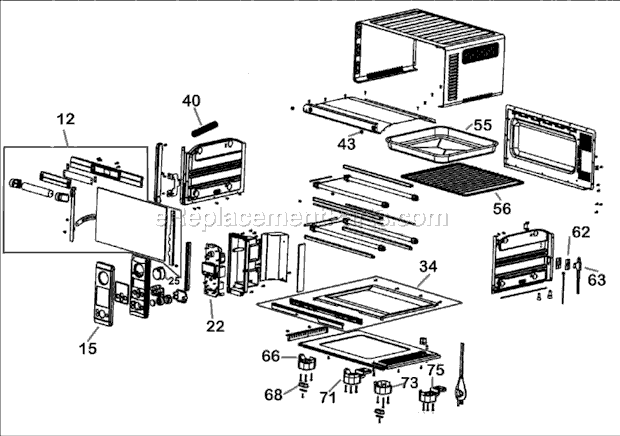
This was to fix the Breville mini smart oven, model number BOV450XL.
It took a while just to remove the 41 screws while trying not to strip the threads. The toughest part was to slide the back panel off after all the screws were removed and not clear which part exactly to replace. I\'ll list the tips below.
1. Remove all scre
... Read morews at the back panel and the 4 feet as well as the side screws at the bottom panel. The two front feet have two hidden screws under the oblong rubber. The two back feet have a revel that cannot be removed, that is, they won\'t completely come off.
2. Remove the front feet and loosen the back feet. Wiggle the side panel (where all the controls are) to open enough space to slide off the back panel. I found it easier to rotate the back panel counterclockwise to get it off. I didn\'t warp any of the sheet metal.
3. Unscrew the 2 screws that hold the bracket that hold the fuse assembly. These are the only two screws inside the oven on the divider facing the oven. Remove the wire from the bracket and slide off the housing tube to expose the fuse , which is what needs to be replaced. ( I wasted a lot of time here thinking that I had to trace the wires and to replace them at their connection points and ended up cutting off all the ties for nothing). There maybe a way to replace the fuse at the original connection points, but I just cut out the bad fuse and connected the two ends of the new fuse to the old wire by using wire nuts. Place wire and fuse and bracket together as you found them.
4. Plug the oven in to see if it worked. If not, check all connections, if it still won\'t work, maybe fuse is not the problem.
5. If the oven comes back alive, you can spend the effort to put all parts back the way they were.
This fixed my oven!!!
I followed the instructions left by previous users, especially the ones titled \"Thermal fuse blew out\" and \"My Breville 450 toaster oven just died mid-use (fuse blew)\".
1. I removed the screws from the back, feet (including those hidden under the rubber tabs), and the two on the bottom side panels. I sketched a diagram and numbe
... Read morered the location of each screw. Then I numbered the cups of egg cartons and used them to keep the screws etc. in order.
2. I slid off the back panel.
3. I removed another screw on the bottom left side that is accessible through a hole in the metal edging. That allowed me to pry open the panel housing the wires and circuit board.
4. I clipped off the wire ties.
5. I left the fuse mount in place, but pried it open to remove the fuse.
6. I unplugged the fuse from the 2nd slot in the circuit board as described by another user: \"On the plug you\'ll see how those two curled pieces of the fuse end are on the plug. Using a very small screwdriver very gently insert it into the little opening in the plug. You want to open the fuse end a tiny bit so it can be pulled off the plug.\"
7. I un-crimped the fuse cap that held the other end of the fuse together with the power cable following the instructions of another user: \"First grab some needlenose pliers or other instrument that lets you crimp down on the cap in the opposite way it was crimped. Picture a + sign. There\'s top and bottom, and left and right. If it was crimped in the top/bottom way, you\'ll want to squeeze the left/right way.\"
8. I plugged one end of the new fuse into the second slot on the circuit board.
9. I twisted together the wires from the other end of the fuse with those of the power cable, inserted them back into the fuse cap, and re-crimped it closed.
10. I taped together the fuse with the other wires so that they\'re held in the middle of the wire compartment, not touching any of the oven walls.
11. I cleaned as much of the oven as I could.
12. I screwed back in the screw underneath the wire compartment. This helped hold the structure of the oven steadier for the next step.
13. The metal panels of the oven had come un-clipped from wires around the edges of the frame. I re-inserted them the best I could so that I could slide the back panel in again. This was difficult and took a long time, because the metal panels had become slightly warped when I opened up the oven to access the wires.
14. I reinserted all the screws and feet.
This is the first fuse I ever replaced. I have no experience with anything electrical. This was hard and took a long time, but it was do-able, and my oven works well again! I also agree with what other users said -- now that the fuse isn\'t touching the hot interior oven wall, I expect it to last a long time.
-Removed about 50 screws carefully separating and marking where screws fit.
-Unscrewed 2 screws on bracket holding fuse assembly replacing with new assembly.
-cut wires from crimped wire nut then stripped end of black wire. Connected black wire to white wire with wirenut.
-cut all tire wraps. Followed 2nd white wire
... Read more to connector. Unplugged and plugged new wire in. Was a very tight work space.
-replaced wire ties to hold wires together.
-carefully slid back onGǪ..put feet on then all other screws.
- recommend taking pictures as you take apart. Helps when putting back together.
Remove all loose screws holding the housing on. Remove covers. Remove blown fuse by cutting wires and attach new fuse to existing wires with wire nut connectors. Reinstall or covers
This part is in stock in our warehouse and will ship out within 1 business day of the order being placed.
New stock is on the way! On order parts usually ship within 7 business days.
Item is not in stock and usually ships 10-15 business days from the time you place your order.
This item is no longer being made by the manufacturer, and cannot be added to your shopping cart.
✖
Mail-In Recycling Rebate
Some of the parts we sell are eligible for mail-in rebates since we can recycle them. We will display any applicable rebates in your shopping cart. To redeem your rebate, contact Customer Service after you have received your part.