How to Diagnose a Bad Power Cord or Switch
This article outlines the basics of power tool and appliance electrical diagnosis. You can use a multimeter to test tool and appliance cords and switches, the two parts usually responsible for electri...
How to Replace the Blades on a Hand-Held Planer
For a planer to do its job, you need to make sure the blades are as sharp as can be. This article will walk you through the steps needed to change your Planer blades so you always get the best perform...
Power Tool Care and Maintenance 101
This article suggests guidelines for power tool care and maintenance. It also describes information tools available at eReplacementParts.com.
Discussion
Discussion for the Ridgid TP1300 13" Thickness Planer
The part number AC8630 planer knife set is made for a 13 inch planer. The Ryobi AP10 is a 10 inch planer. The part number for the knife set you will need is 6660425.
Ridgid carries a 3 year warranty on there tools. In this case the 13 inch planer. I am not sure what type of warranty covers parts installed by the tool owner. You will have get in contact with the company you purchased it from. Quite a few repair centers will not cover any electrical part that was not installed by them.
I need to replace the infeed roller on my Ridgid 1300 planer and was wondering if I should replace the outfeed roller at the same time? And should I replace the bushings at the ends of the rollers at that time too?
Hi thenip,
No there is no adjustment.If you are getting excessive slop in the drive chain then most likely you have wear on your roller bushings.Hope this helps.Good luck.
Tinker
When planing, about 2" from the beginning and about 2" from end it is not smooth, it is leaving a deeper cut making an impression. Not sure what parts to start replacing.
Hi mjones,
Generally thats an indication of a roller problem.They might be dirty or worn.I'd try cleaning the rollers first and if that won't work I'd replace them..Whats happening is when the first roller grabs the board it slip enough to momentarily stop the feed and the blades cut deeper into the board.When the secound roller catches the board it feeds the board smooth enough to not allow an over cut.As the first roller lets the end of the board go the second roller splis enough to allow an over cut.Hope that helps.
Tinker
First off, on the right side, there is a blolt that sets the position of the tilt/rotation of the motor, in order to tighten or replace the belt, remove this bolt. If you look at the diagrams, on the motor, you will see a screw on the left hand side of the motor you will have to try using(on the Ridgid/Ryobi it's a allen head screw, labeled as special screw), it's small and the end of it is deep into the plastic housing, the allen key size is about 1/16th or so, it's metric so you will have to try your different small allen keys till you get the right one. Remove that screw, it will permit you to remove the piece holding the on/off switch and the breaker, remove the nut that holds the breaker switch so that you can remove the whole cover, then if you look closely at the bottom, you will notice the pivot rod, it's about 5/16" thick, follow it to the left side, above it (I forgot to mention, that you need to remove the upper cover of the planer and the 2 sides before getting to this point), so above it, there is an allen set screw, back off the set screw so that you can slide the pivot rod, once the set screw is loosened, use a punch to push it from the left to the right, now remove the screw the hods down the receptacle cord and slide the motor out from the left side then, pull it to the left, you may have to make sure that it's not hanging up on the belt. once you have this all done, you should have the motor laying in your hands. (I wrote this when I was tired after a 15 hour day, so forgive my lack of continuity)
The lock for the height adjustment doesn't hold. The wheel turns when the planer is working even though the lock lever is pushed all the way back. Is there an adjustment or does something have to be replaced?
My lock doesn't secure the blade position. When the planer is in progress the adjustment wheel turns. Can I adjust the locks or do I have to replace them?
I am trying to replace the motor on a Rigid 13 inch planer TP1300 - Where can I find either a manual or advise on how to do this. The owners manual does not have anything in it at all about this situation.
I just tore mine apart last night for the same repair. . it isn't easy. Many hidden screws and it is a large jigsaw puzzle. Basically take off outer case by removnig allen screws on top, remove wheel that lowers and raises, turn the black bar that runs behind the motor to loosen, pull out all allen screws that hold the gear mechanism and pull that whole assembly out, then remove serpentine belt so motor will tilt, on left side of unit there is a small hole with a set screw holding the axel the motor tilts on in place, remove that and with a punch drive the shaft out far enough to fully remove motor unit, remove ground screws from base of unit. remove two screws and rigid emblem logo which holds the motor unit together to switch. Remove screws from back and snap ring from around pulley end and the armature should fall right out. That should save you about 2 hours of studying and searching for hidden screws.
had mark on board so decided to change blades took both out and turned them to the new edge. put everything back together. put in board and it spit out infeed side. like the planer is running backwards. what happened?
Hi jc63gal,
It sounds like the knives are set too low. Loosen the blade screws and reset the knives making sure the notch on the knife is seated on the cutter-head. What is happening is the knives are lower than the feed roller and the direction of the cutter-head is forcing the stock backwards.
WJA
Makes a reasonably loud knocking noise; like maybe a small piece of word or metal might make it repeated thrown against a hard surface. The three rollers do not seem to have a bearing problem. The machine has probably been used a total of 15 to 20 hours.
The orange belt looks like it may have a flat spot. That is the only thing that I can casually see. Any suggestions?
I need to replace the pinion gear. I have removed the gear box and I am attempting to remove (at opposite end of cutterhead) the pulley to get at pinion gear. After removing the pulley LH thread nut, the pulley refuses to budge. I can see what appears to be a pin in the pulley body impinging on the pulley threads. How do I remove the pulley and then replace it? Thanks, Al-paldco.
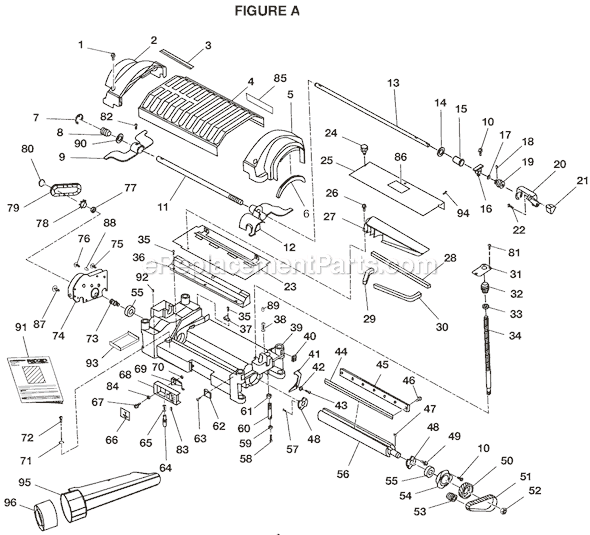
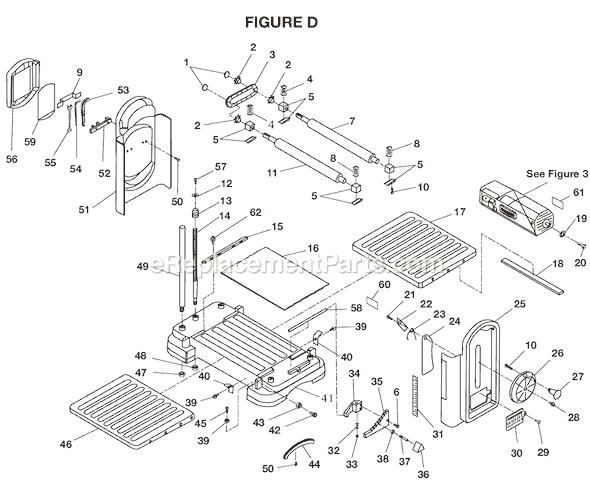
There are two rollers on your planer, the infeed roller and the outfeed roller. both rollers are shown on page D of the parts diagrams. The infeed roller is part #828939 and the outfeed roller is part #828938. Both parts are available from http://www.ereplacementparts.com.
The motor is sparking badly and burning the brushes.
I have cleaned the brushes but it has not solved anything.
I would like to disassemble the motor but there are no instructions for getting the motor assembly out of the planer.
What could be wrong and where can instructions be found?
I just tore mine apart last night for the same repair. . it isn't easy. Many hidden screws and it is a large jigsaw puzzle. Basically take off outer case by removnig allen screws on top, remove wheel that lowers and raises, turn the black bar that runs behind the motor to loosen, pull out all allen screws that hold the gear mechanism and pull that whole assembly out, then remove serpentine belt so motor will tilt, on left side of unit there is a small hole with a set screw holding the axel the motor tilts on in place, remove that and with a punch drive the shaft out far enough to fully remove motor unit, remove ground screws from base of unit. remove two screws and rigid emblem logo which holds the motor unit together to switch. Remove screws from back and snap ring from around pulley end and the armature should fall right out. That should save you about 2 hours of studying and searching for hidden screws.
I am waiting for the replacement brushes for my planer to arrive but have a question. How tight should the brushes be inside the holder? the ones I removed were impossible to remove without damaging them. I mean VERY tight. I have replaced brushes on motors before, but have never seen them this tight of a fit. Most usually slide right in. Any advice would be appreciated.
Hi james, The brushes should move freely up and down the brush tubes. They may have corroded or saw dust might be jammed between the brush and brush tube.You might try blowing compressed air on both sides of the brush tubes to remove any dust etc. Also you can put a few drops of penetrating oil and let it sit then if you can reach the front and back of the tube gently pushing back and forth to see if the brushes can be removed. I've had them so tight that we have had to replace the brush tube so good luck.Hope this help.
Tinker
Reply: Replacing Carbon Brushes In A Ri...
Duck69
Thanks Tinker. I hope it's just the brushes. I was planing some white oak and the motor started sparking then quit, followed by some smoke......ouch!!! I figured the brushes would be the best place to start.:confused:
My Ridgid planer skips occasionally, and I noticed the rollers are badly torn. Is this causing the skipping problem? If so, does anybody have information on how to replace them?
Its the older Ridgid 13". The model number on the machine is tp1300.
Reply: Ridgid 13" Planer
Tinkerdave
Rollers generally won't cause a skipping problem as long as the wear is even on the rollers. The problem you have is most likely caused by the roller bushing being worn.The bushings are made of bronze and have a lot of lateral force place on them during the operation of the planner.As the bushings wear the center of the rollers axes is off enough to not allow both rollers to be inline with each other.this causes slop in the feed chain and cause an uneven feeding of the product as it moves through the planner.With the planner unplugged reach under the planner and grab the roller and see if you can feel any play it it.Feeling play by doing this is not always possible so you might have to take the side cover off and visibly inspect the bushings.Hope this helps.
Reply: Ridgid 13" Planer
Art65
Thanks for the help. I took the side off and there is some slack in the chain that connects the outfeed roller to the blade roller. also some slack in the other chain connecting the two feed rollers. Is that normal? I did some more research and discovered that this skipping may be caused by incorrect pressure from the outfeed roller. Where do I look for wear on the bushings? and can the bushings be replaced?
Thanks for any help - as I use my planer alot.
Reply: Ridgid 13" Planer
Tinkerdave
Hi, On your model you have four bushing blocks. Just follow the rollers out to the end and you will see them.They can be replace and are part of a normal wear item for planners.
I have a ridgid tp1300 planer. I changed the brushes in it. The replacements were to big and one got stuck i had to pull it out with plyers. I needed to use it so i soildered it and sanded it off and put it in. It worked for a little while but it started sounding like the brush was worn and before i could shut it off it quit. I bought new ones and sanded them and put them in and it would not run. I looked in my book and it said it could be the switch or a supply fuse blown. I think that is it the fuse. But i can not find that fuse can you help?
i have a ridgid tp13000 planner all the gears and belts are in place and the blade and is turning but the rollers are not. the chain is not broken. is there a shear pin or something i can't see and how can i fix it, thank's
I am trying to replace the motor on this planer and there does not seem to be any instructions, that I can find, on how to do this - can you help or guide me to a manual with the instructions I am looking for.
I just tore mine apart last night for the same repair. . it isn't easy. Many hidden screws and it is a large jigsaw puzzle. Basically take off outer case by removnig allen screws on top, remove wheel that lowers and raises, turn the black bar that runs behind the motor to loosen, pull out all allen screws that hold the gear mechanism and pull that whole assembly out, then remove serpentine belt so motor will tilt, on left side of unit there is a small hole with a set screw holding the axel the motor tilts on in place, remove that and with a punch drive the shaft out far enough to fully remove motor unit, remove ground screws from base of unit. remove two screws and rigid emblem logo which holds the motor unit together to switch. Remove screws from back and snap ring from around pulley end and the armature should fall right out. That should save you about 2 hours of studying and searching for hidden screws.