
How to Replace the Blades on a Hand-Held Planer
For a planer to do its job, you need to make sure the blades are as sharp as can be. This article will walk you through the steps needed to change your Planer blades so you always get the best perform...
Power Tool Care and Maintenance 101
This article suggests guidelines for power tool care and maintenance. It also describes information tools available at eReplacementParts.com.
I have new bearings (6202LLB) for my Makita 2012 Planer.
Do these Ball Bearings have to be pulled off the shaft with a bearing puller or should they slide off??
When I use my planer the boards are not self-feeding. You have to help boards through by pushing & pulling. The rollers are spinning, but most of time you have to help push the boards through.
Same problem, is there some sort of adjustment? I have to move the table up a lot to make contact with the blades, but once this is done the wood is pinned to the table and the rollers just spin on the crushed wood. I tried changing blade but am having no luck.
You might want to take a look at our discussion forum. A forum member recently did the same repair that you are considering. I bet he would be happy to answer any questions you may have. You can join in on the discussion at the following link...
My 2012 is skipping when lumber is being fed trough. I can't tell if it's in the roller linkage or the cutterhead linkage. The roller bearings do not seem to be worn (how could I tell?) and the chain drive sprockets look fine (one of them is new a replacement ordered from you guys). The only thing that seems odd is that one of the roller shafts does have about a 1/2" of side to side movement when the chain and its sprocket are removed. The other roller does not slide like this. Could this be the problem? Do I need to crack the motor housing to look at the gears in there? Is there something I should test before doing this? Thanks.
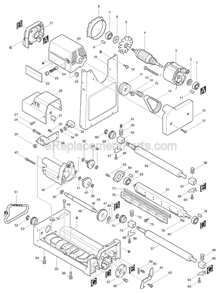
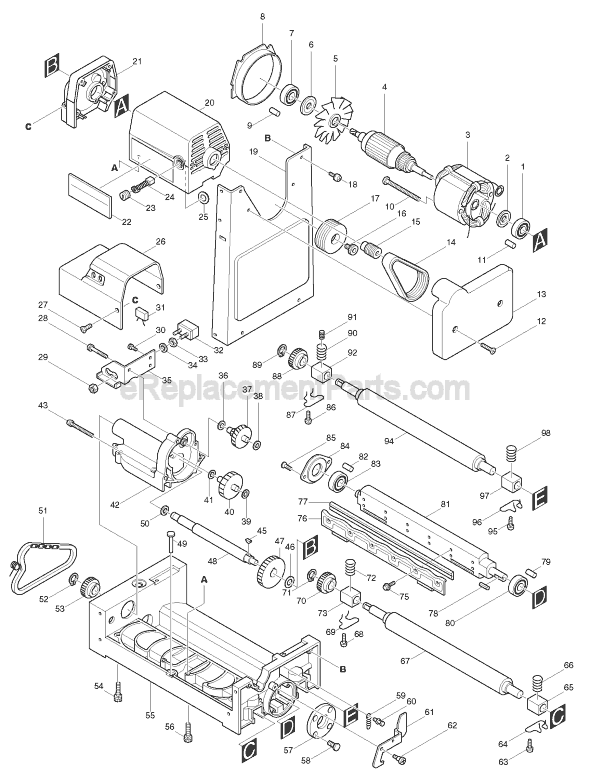
I am guessing that the "skipping" is related to the play in the roller. The feed rollers sit in metal bushings. I am going to guess that one of the bushings has worn out and is no longer supporting the roller. With the roller not supported slack will develop in the chain and then it will skip on the cogs. You will want to inspect all four of the roller bushings, item numbers: 65, 73, 92 and 97. There may also be damage to the rollers themselves, item numbers: 67 and 94.
The small poly belts can be a challenge to replace. They are not very pliable so trying to sliding them over each pulley can be frustrating. The secret we have found is to heat the belt first. Run the belt under hot water for a few minutes and then try to install. The heated belt will be much more flexible and you should now be able to slide it onto the pulleys.
I hope this helps with your repair!
-Mark
Reply: Belt Replacement
OregonMike
I changed this belt yesterday as follows: Remove the top cover to the lock shaft, then pull big drive wheel from planer shaft after locking it in place. Take care not to loose the square key. Boil some water and immerse the new belt. Run the belt around the big pulley as tight as you can and hook about a third of the belt over the small wheel. Pull the big wheel onto the shaft but don't put it all of the way in. Rotate the big wheel on the shaft to work the belt over the rest of small pulley. Reinsert the key and slide the pulley back on. Replace shaft screw etc.
I inspected the rollers on my 2012 planer while troubleshooting a "skipping" problem when the planer is under load. Sure enough, the end of one of the roller shafts was scored pretty bad. The bearing didn't show any visible wear so I'm guessing that the previous owner may have replaced the bearing and not the roller. Mark responded to my original post about this on the parts page and said that play in the roller bearings could cause slack in the chain and produce the skip. It turns out that the guilty roller shaft does move from side to side. Is the scored shaft and almost assuredly worn bearing causing this or is there something else going on that I haven't discovered? Also, can I use the roller for the 2012NB? It's less expensive! Right now, I'm thinking that a new roller and four new bearings are in order to get the 2012 screaming again.
I figured that was the problem. The only other part that could be causing the side to side play would be if the cutterhead casting had been worn down by the bushings. I would really doubt that though. As far as swapping parts between the 2012 and the 2012NB, the bushings appear to cross over but the rollers are different.
Let us know how the repair turns out!
-UtahAV
-Mark
Reply: Makita 2012 Planer Roller And Be...
wapitiscat
Okay. I ordered the roller and new bearings (went ahead and ordered a full set of four). I'm getting close to spending the cost of a new planer :( .One thing I noticed when I was looking through the parts diagram was that the single "inner" compression spring (91, #231460-7) was located on the left side of the outfeed roller. When I disassembled my planer, that smaller compression spring was on the right side of the infeed roller. I'll reassemble according to the diagram but I'm wondering if that could be messing things up. I guess this extra spring tension serves some purpose with respect to grabbing stock that might not be flat (?). Any thoughts?
Todd
Reply: Makita 2012 Planer Roller And Be...
UtahAV
I could be wrong but I believe that the extra spring is due to the direction of rotation of the drive chain. I believe that the drive chain is rotating upward as it travels around the sprocket on that corner of the planer. The upward rotation would tend to want to lift the roller so additional downward pressure is needed. Just a guess but it makes sense to me anyway! :D
-UtahAV
-Mark
Reply: Makita 2012 Planer Roller And Be...
wapitiscat
I was messing with the planer again last night and looked closer at the sideways movement of the feed roller I've mentioned in previous posts. With the bearings(bushings), compression springs, and retaining clips in place, the side to side motion is limited when the shoulder of the roller shaft (not the urethane coating) hits the inside face of the bearing. Assuming that the parts all match with respect to model number, the only way to take up this space is to move the bearings closer together. Could the retaining clips be worn or bent so that they don't pull the bearings in tight enough along the roller shaft? While the sprocket end of one roller shaft was chewed up and needed replacing, I'm starting to doubt whether replacing the roller and bearings is going to do the trick.
The one thing I can think of that I haven't done is seeing how the roller behaves after the sprocket is in place and clipped on. Maybe the back face of the sprocket snugs against the outside face of the bearing and effectively takes up the slop. I'll look at that tonight.
Todd
Reply: Makita 2012 Planer Roller And Be...
wapitiscat
I checked the feed roller again and have abandoned the idea from my last post. I think that there is going to be some side to side movement available to the roller but the scored roller end was causing the assembly to "track" towards the sprocket and causing the skip. That's my story tonight. I'll try to hush up and wait for the new parts instead of trying to imagine what was going on.
Todd
Reply: Makita 2012 Planer Roller And Be...
wapitiscat
I realize that there's probably only a handful of folks in the world still messing with this planer but thought I'd followup on my repair efforts. I finally got the replacement feed roller and bearings yesterday but when I went to put install them, I found that the new roller wasn't machined to accept the Woodruff key in the sprocket shaft. The OEM key sat too high in the shaft groove. So, after waiting two weeks or so I had to wait one more day. I picked up a square key today and will have to cut it down to length but think it will work. I'll try to get it running tonight and post again tomorrow.
Todd
Reply: Makita 2012 Planer Roller And Be...
wapitiscat
I got the 2012 back together last night. If you are really bored, read in one of the previous posts about side to side movement of the feed rollers between the bearings. Here's how I think things played out. The roller shaft got chewed up and caused it to have a tendency to "walk" when under load. This in turn put stress on the retaining springs and bent them out over time. This allowed more movement of the roller shaft between the shoulders of the bearings. This went on long enough to create enough movement in the system that the drive chain was able to skip when under load. When I reassembled the planer, I bent the retaining springs so that the bearings were snugged up against the shoulders of the feed rollers. I ran a board through and couldn't reproduce the skipping so I think the problem is solved. The bottom line is that I never should have bought this in the first place. It was an eBay purchase and I found out after I got it that it had lived a very tough life. I'm treating this as a tool rescue and will continue the rehabilitation for a little longer. I may buy some new retaining springs just to see if they are set to hold the bearings tight when they come from the factory. If this helps one person in the future, all this typing will have been worth it.
Todd
Reply: Makita 2012 Planer Roller And Be...
UtahAV
Good to hear that you have the old planer up and running again!. The 2012 planers where great machines and I think once you get everything restored you will get years of reliable use out of it. Thanks for taking the time to post your repair log. People do read these and I am sure you will help many others.
The 12" planer is not running smoothly even when no lumber is being fed. It seems the drive chain is skipping a tooth, or the tension spring is not maintaining an even pressure. I have cleaned the chain and sprocket and lubed with motorcycle chain lube. I also reversed the blades to the fresh edges. What else should I inspect and clean or possibly replace?
Hey Dave,
Check the roller plane bearings for wear..part# 2142511..items 73 and 65 on the breakdown..also inspect the sprockets for wear or damage..make sure you drive belt and pulley are in good shape..
parts avail at ereplacementparts.com..
Hope this helps..?:)
Craig
The Makita 2012 planer has easy blade and belt changes. It works great for small jobs. I would buy another, but the 2012 is an older model and is probably not available anymore.
I have owned this planer since the late 1980's and have put many thousand feet of all grades of lumber through it. I also own a Grizzly 20" planer, this Makita planer has proven to be beyond my expectations. We build custom cabinets and use a lot of oak and are most pleased with the planer. There are some who have learned wood working in this shop, they too have purchased a Makita planer. Thanks Makita.