







How to Diagnose a Bad Power Cord or Switch
This article outlines the basics of power tool and appliance electrical diagnosis. You can use a multimeter to test tool and appliance cords and switches, the two parts usually responsible for electri...
How to Replace the Blades on a Hand-Held Planer
For a planer to do its job, you need to make sure the blades are as sharp as can be. This article will walk you through the steps needed to change your Planer blades so you always get the best perform...
Electric Power Tool Parts 101
This article defines the basic parts of most power tools, explains how they work, and what to look for when they stop working.
Discussion
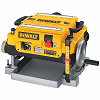
Discussion for the DeWALT DW735 Type 1 13 Inch Planer
Hi smdemar,
Depending on how many hours you have on the planner you might consider replacing the following while you have it apart. 5140010-00 Dust Shroud,5140011-74 Fan,and Fan Housing Set (Includes Both Parts Of the Housing. Reason being there is accumulative wear on all these parts and a perfect seal is needed to make sure that the chips are expelled out of the exhaust.If not you will get an accumulation of chips building up around the exhaust shroud causing future problems.
First remove your shroud then remove the housing clips and screws. If I remember right you need a 12mm socket to remove the nut that holds the fan on the shaft.Then the inner housing has 4 screws that hold it to the link removed on your serial number they used a couple of different types of screws. Reassemble in reverse order.Hope this helps.Good luck.
Tinker
Hi Kennyg,
Well there's two views on this. First Dewalt has no call out that I can find on what lubricant to use. The bushing is a bronze bushing which itself acts as a lubricant and needs no further lubrication.Others put a light coat of grease on the bushing as a lubricant.We always put a light coat of teflon grease when we replace the bushing but the choice is yours.Hope this helps.Good luck
Reply: Lubricant For Bushing
kennyg
Hi Tinkerdave
That helps a lot! I will go with the Teflon grease.
One of the 8 pointed sprockets broke in half the other day on my machine. These are the sprockets that help turn the rollers and are connected on each side by a small (bicycle type) chain. They seem to be held onto the roller shaft by a flat type of cotter pin. Anyone ever tried to replace this before or is this a take it into the shop kinda fix?
Seems the chain is kind hard to take off and woudl be hard to put back on.
Any thoughts would be appreciated?
When replacing the bushings for the feed rollers, what type of lube is required for the new bushings? When I pulled the old ones off (one was messed up and jammed) they seemed like whatever was on for lube was extremely thick. Any thoughts?
Hi rejd,
Well technically link removed uses a self lubricating bronzes bushing.Putting any oil or grease on them will attract dirt and act as a lapping compound accelerating the wear of the bushing.I guess you could put some powered graphite on them if you wanted.Hope that helps.Good luck.
Tinker
Reply: DW735 Replacing Bushings On Feed...
rejd
Great, thanks so much. I was wondering that but there was some thick "grease" like substance on them. Wonder what that was.
Have been using the planer to clean up the redwood deck lumber on my deck. I gouged the base plate up pretty bad. Is this part just that plate, or the whole base assembly?
ok, so i am on my second one of these bad boys. i have liked them and have gone through a few things, ie new chains and sprocets, new bases, and dust shrouds, but recently i ust replaced both rollers with ones i got here, and as soon as the were put in, i all of a sudden was getting 1/32" snipe 4 inches in on both sides. yes, the blocks are are installed with the groove /notch face down, and i thought that maybe there was too much pressure on the rollers, so i took it apart and shimmed the table side of the roller hold downs with a small piece of cut flashing as to push the rollers further up and have found now that the snipe has disappeared but the rollers just don't seem to grab as well and i am constantly having to push the stock through. was wondering if there is an adjustment for the cutter head, or does anyone have some newer rollers they can caliper and give me their diameter so as to see if perhaps mine are just a touch too big. or even better yet, maybe someone knows just exactly what the hell is up and can just tell me. thanks.
Could be you have wood chips in the chain and sprocket. We have a frequent problem with our planer, the fan housing over time gets holes worn in the sides allowing saw dust to clutter chain and sprocket area. Pop the lid blow and vac out also spray with some dry lube and check fan housing.
Reply: Adjustment Wheel Is Binding Up
randamadee
have had same thing as chwoodworker mentioned. the foam goes on the dust cover. i only ever have one post that gets clogged around the chain and sprocket, the back left one. have to do this especially often the wetter the wood is. a pain, but it cranks like it should. good luck.
Reply: Adjustment Wheel Is Binding Up
rosey
I just ran into the same problem what happens is sawdust builds up between the sprockets and chain forcing the chain out so much it put enough force on all parts when cranked it bent the slack adjuster and caused the drive sprocket to brake, once you continue to crank the table comes out of kilt or true plane and will bind. The problem now is once the repairs are made how do you get the table back to true. Also found a broken spring on the drive chain not related. I believe the cause was the owner used oil to lubricate the 4 post causing build-up and the chain to expand hence the problem. Now to get it back on true plane. fun fun
The carriage on my planer is broken and I'm trying to figure out how it happened. My contractor says that it happened when the carriage was lowered on to sawdust.
My DeWalt 735 stopped ejecting the chips out the port and as a result they back up and come out front and back causing the machine to work harder. How do I fix this?
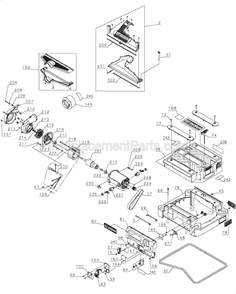
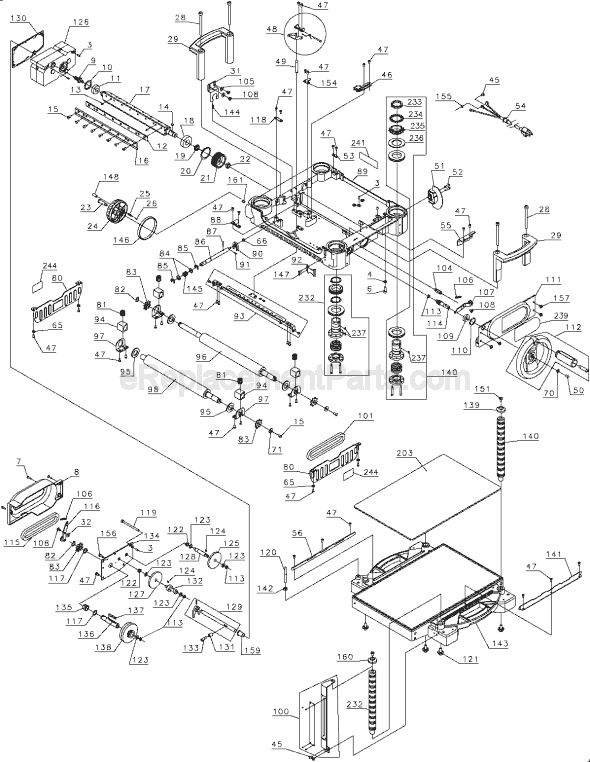
This could be a couple things. I would start by taking off the top cover (part 75). Then remove the three red screws sticking up that hold on the dust shroud (part 150). If this is blocked then clean it, that may solve your issue. If the problem persists after you reassemble or it is not blocked you issue is much greater. In that case it would be the fan (part 215) and that will take some time to replace.
Reply: Exhaust
Jim
I have also found that if you replace the shroud (part 150) that might fix the problem as well. The shroud gets worn with the amount of chips blown through it. It gets worn thin and then allows the leak.
I was running a lot of boards through my planer and it quit running. I have power going back to the motor but nothing happens when I turn it on. No smoke but I had to push the boards through the planer when it quit. A motor problem?
I have seen this before and it is not an easy fix. It sounds like the field lead going to the brush holder. This is very tricky to test. You have to test voltage going across the field by pulling it halfway apart.
Reply: DW735 Quit
Ronnie
This happened to me. I took the brushes out and found a lot of fine dust. I used my shop vac to remove the dust, put the brushes back in, and fired it up. Works like it a champ. Hope this was helpful. Good luck.
Reply: DW735 Quit
MDT2011
Saw this problem also, The clip from the brush sleve had broken off due to metal fatigue. New sleve recconnect wire from field and I was back in business.
While removing the feed roller from my planer, I raised the cutterhead above the planer assembly so high that when I attempt to lower planer head down it now binds up when top screw threads are met. How do I restart the screws and still maintain alignment?
Not sure if you ever figured this out, but I have. Bottom threads are spring loaded. Either get a second set of hands or sit on the top of the machine to manipulate the upper threaded slots while lightly cranking the unit down. It should take fairly easily to threading when manipulated either side to side, corner to corner, or front to back. Make sure it's unplugged before doing any service work.
My dw735 started making a horrible racket. Upon dis-assembly I found the nut holding the planer knife shaft pulley had spun off and was rattling around. Nothing appears damaged. Can I just re-tighten it? To what torque? Anything else I need to know?
Jon, The black wires connect to the right side. The black wire with the band around it goes on the bottom, my covering is a transparent blue for the bottom wires, the same goes for the white, it also has a band around it.Be careful you don't accidently disconnect the micro switch or circuit breaker when you put the housing back in.
One of two things is happening. Either the sprockets that drive the feed rollers have shattered (which is common with this planer) or your blades are just dull. Very rough stock is also hard to plane with any portable planer due to the rubber in feed rollers and low h.p.
Yes I just stripped the sockets on three, and have only one blade changed. I looked up part numbers for DeWalt DW735 thickness planner on eReplacementParts (Number 15) on Parts List. Funny thing, on Right side of page the first item listed as Most Popular Part. Further down on page they list a package of 24 Screws for Blade Screws. It seems others have same problem.
Reply: Tight Blade Screws
randamadee
these screws are a ******* if cold. have stripped a few in my day. give them a quick blast with a butane lighter and it always helps. as for the ones that are stripped get a screw extractor bit and do it yourself. sending it away is so not needed. i keep a half dozen screws on hand now just for when this happens.
I have had to replace 2 sprockets and 1 chain now. I keep my cut to less than a 1/16. Last night, the sprocket and chain went.
They are both the original OEM parts. I am running 12 boards, 7-12" width and 8feet long. Cutting at 1/16 or less.
Is there anything I might be missing like a bad bearing causing the gears/sprockets to be frozen? I did notice the "black feed roller #96", the exit side does not turn easy but I am not sure if that is tied into a gear inside?
Well after spending 6hrs disassembling the machine, here is what I found.
Dust, debris, etc. will bind up the feed rollers enough to make them seize.
Raise the head to highest setting.
Take off cover plates that expose sprockets and chains.
Underneath where the cutter head is, remove screws that hold in both black feed rollers.
The rear roller, you need to remove one sprocket, on the left side, looking at it front the front.
When removing the phillips black screws, the roller assembly will lower and out.
Cleaning..
There is a metal block, felt washer attached to each side. Be surprised how stiff/lock this can be. I took apart, clean and re lube. It's a friction roller and to me a poor design.
put back.
Make sure the little slot on the metal block is facing down. Take notice when removing!!!!
My rollers where so bound up, it broke sprockets and chains...
Again, just take a look at how the roller is mounting, especially the little block before unscrewing.
-Peter
Reply: Sprockets/chains
mitch
On mine the feed roller froze up to the bearing block and caused the sprocket to break.
Reply: Sprockets/chains
jim
It seems like your sprockets are not in line with each other. Check that with a straight edge.
I was having the same problem when I noticed one of the threaded posts that the sprockets are on was turning with the sprocket. It totally wacked that one corner. I adjusted the post(it has flats spots on the bottom enabling the use of an adjustable wrench), then tightened the screw underneath. Raises and lowers much better. B&D should have designed it with teeth on the bottom of those posts so they won't turn after being tightened. I still have to replace both bearings in the motor (totally trashed), replace fan shroud, and a few other things...then should be like new.
Planer motor got hot. Brushes arching more than normal. Smoked some and speed is reduced. Will new brushes likely fix this or will I need a new armature as well?
It sounds like the armature and possibly the field have been damaged. The arching you saw is caused by the bad armature. The smoke comes from the epoxy insulation on either the armature or field melting and burning off. You will need to inspect the field, looking for signs of heat damage. Also take a look at the plastic housings. They can sometimes melt when the motor is overheated. The armature is part #5140011-80, the field is part #5140011-78 and the motor brushes are part #5140011-85.
All of these parts are available from http://ereplacementparts.com.
Good luck with your repair!
-Mark
Question:
Rich
Raising and lowering for different thickness materials is very stiff. How to fix this?
This is usually caused by the lifting screws being caked by sawdust. You will need to clean the screws. Once cleaned protect them and lubricate them with paste wax. The same type you would use on furniture. Saw dust won't stick to the wax once it dries.
I hope this helps!
-Mark
Reply:
Abe Low
I had the same problem and discovered chips had been compressed in the sprocket by the chain. The worst one was the one at the far right. DW put a small door/vent on the case that makes blowing the chips out of the sprocket easy. Problem fixed. BTW, the screws were clean.
I have a DW735 13" Planer and can not get the screws out that hold the blades in. I am not sure if I need to to put some kind of lube and make a big mess even later. My wrench that came with the mach. has almost rounded of and of course the company does not list the size of the bolts or the wrench. I think it is a 4mm wrench but not sure about the size of the thread size of the bolts. Anyway I don't know what to use to loosen them.
Any Help Would Help
Try a little heat around the bolts. they may have locktite on the threads.
Reply: DeWalt Tool
bbaker
Just purchased a used 735 planer and discovered this stuck screw problem while attempting to reverse the blades. Of course it wallowed out.
Tried vice grips on the side of screw, heating with torch, no results.
Finally the solution, which saves a service charge and lots of down time:
Take a small hammer, about 10 ounces, and a sharp small cold chisel (I used one about 5" long), raise the striking end of the chisel up for just enough clearance to hit it with the hammer, and tap the screw just left of center so it will turn counter-clockwise. Only took about two or three taps to break it loose.
Wear gloves and wedge a piece of wood between the blade and the inside of the blade housing to prevent movement of the roller, and good luck.
If you happen to wallow out the screw, (they are only 85 cents from this site, diagram #15), just leave out the screws on the other two blades at the same place until your new screws arrive, that is if you absolutely can't wait for your order to arrive.
This is an craftsman's trick, I am retired but was a master craftsman for 40 years. We used this trick in the shop if we wanted to save the screw and didn't want to chisel off or saw off the screw head.
BTW, you can improve your allen wrench by slowly grinding off the end until no wear marks are present. Just be careful not to get the metal too hot, and re-temper the wrench by dipping in water after grinding. Also, a good quality wrench is a must.
Hope this is helpful to all.
B Baker
Former Chairman of the Virginia State Apprenticeship Council, which oversaw about 5000 registered apprentice sponsors, and 15,000 apprentices. Appointed by 5 consecutive governors.
Training: 4 year registered apprenticeship in multi-crafts, with a 4 sheet metal mechanic course concentrated in the last two years.
Awards: Best 4th year apprenticeship in North Carolina, awarded by Labor Commissioner Jim Long.
the crank handle broke off and all that is now attached is the piece going on the shaft. can anyone tell how to get that piece off so I can put new crank on?---please-----
On my two month old reconditioned DeWalt planer, the DW735, the feed rate switch is stuck in rate 2. I've swtich gear before while the unit was running as recommended, and it worked fine. I tried again yesterday and it will go to the neutral position where it is between gears and feed roller is not moving, and it will go back to 2 okay, but just will not switch to feed rate 1. Any ideas?:confused:
Hey all,
I have a DeWalt 735 Planer and used it on and off for the past 2 1/2 years - EXCELLENT planer for the money. Have had no problems at all until...I enlisted the help of a couple friends (with no experience at all - my bad; I know, and have already slapped myself silly like I deserved) to keep feeding - and unloading - a stack of 6" wide cypress boards while I took care of some other important business for a few minutes. One of the boards was longer than the outfeed side of the shop, and neither of them thought to angle the planer towards the corner. The bottom line is the board got stuck; the guy on the outfeed side tried lifting the end over his head (to gain length) and wiggled it some - all to no avail - so the other guy turned the machine off. I ran back in when I heard the planer stop, but by then they had angled the machine and yanked the last 3" of the board out. After a cursory check I turned it back on and tried feeding another piece but no luck: the motor ran but the board wouldn't feed, so I turned it back off. We took the side off and found the belt had worn through and was broken. Now we come to the question I have.
Is it likely that the v-belt is the only thing broken, in other words should I just buy and replace the belt or does someone have some experience with this kind of mishap that tells me I probably broke something else as well; hence the long story. Any help would be most appreciated. Thanks.
More than likely its just the belt. When the wood jams the feed roller the belt pulley will keep spinning in one spot and burn through the belt.
One other common problem is the chain sprockets on the feed rollers tend to crack in half under load, but it would be a rare thing to have both happen at the same time, even under "unique" situations like the one you encountered. But the sprockets are cheap (about $3.00) and easy to replace so you might consider ordering one of those too as a spare to save any downtime if one does crack.
Reply: DeWalt 735 Planer - Broke Da Bel...
HaoleRuss
Please accept my belated thanks for your reply. I have since replaced the belt and that took care of things...but the hits just keep on coming!! Now the head won't move - up or down, more than 1/2 a turn of the handle.
This is my own fault, then again I believe most problems are the result of operator error to some degree, but I digress. We were finish planing a bunch of Eastern White Pine that we had previously milled from logs on a Timberking bandmill then dried in our electric dry kiln after over a year of air-drying. It goes without saying we were low on the learning curve concerning proper kiln operations, so the inside of the planer was caked - no joke - with pitch. I scraped it off the housing but the chain that raises and lowers the head is also pretty "gummy" and I think I need to take it our and clean it good, as well as the sprockets in the corners. Coincidentally, the same thing happened to my table saw, for the same reason, and cleaning fixed it. No real question here, but a reminder to keep your tools clean. On the other hand, if anyone has any tips, feel free to offer them up.
Russ
I have a Dewalt DW735 planer and I need to change a bearing in it that has fried. I have the motor out and the parts to do the repair. Can anyone tell me how to get the belt pulley off of the motor so I can change the bearings??
The dw735 is the best semi-portable planer I have found. There are a few design flaws though. The worsst thing about the 735 is the fan shroud design. very deficient thin plastic, and the exhaust fan eventually throws enough wood chips at the shroud to wear through the super thin plastic and then dust & chips fill the inside of machine binding the height adjustment system causing even more problems. I have two 735`s, and have gone through 4 sets of shrouds. Also difficult to keep the planer head, and complete top of machine, parrallel with the table. The service center had no idea how to make this adjustment, there is nothing in manual, we had to figure out on our own. one side could be off by as much as 15/1000 to the other.
Would you mind sharing how you made the adjustment?
Reply: DeWALT - DW735
Gary
Could you please tell me how to reset the adjustment----mine does the same thing and now I can't raise or lower!
Reply: DeWALT - DW735
Houston
I too have the same problem. I can run a 3" wide board thru the left side, then run it thru again in the middle and cut some more, then run it thru again on the right side and cut some more. Would really appreciate you sharing what you did to correct this.
Reply: DeWALT - DW735
randamadee
. crank all the way up and measure the distance to the table to post mounts on all 4 posts. if any measurement is different then you have to adjust so there is no skew. i found by removing the base with he 4 allan screws on the bottom. the depth guage has to come off too. give the base a tap with a hammer to get it off and once off you will find that each post will spin independantly of the other. i spun each one until they all shared the same measurement then screwed the base back on. no more skew for me anyway, however i have heard somewhere else someone having this problem(i think it was a site called lumberjocks) and there was a screw loose on the inside around one of the posts, but to get at it the so much has to be removed. i would try the first rememdy i mentioned, and if not then at least ya know where you got to go.
I have owned one of these planers for a year now and have been very happy with it. The two speeds make the finishing cuts near flawless with little or no need for sanding ( a matter of preference) as far as dimentioning it is fast and very accurate, having the preset thicknesses makes cutting multiple pieces very simple and fast. Having found an imbeded piece of steel or nail in a board recently and nicking the blades on one side of the planer I found the one drawback for this planer and that is the availabilaty of replacement blades for it and the cost of them. Otherwise I rate this planer as the best for the price and size of it.